Quick Definition
- [IR obstacle module] [detects] [reflected infrared light from nearby objects]
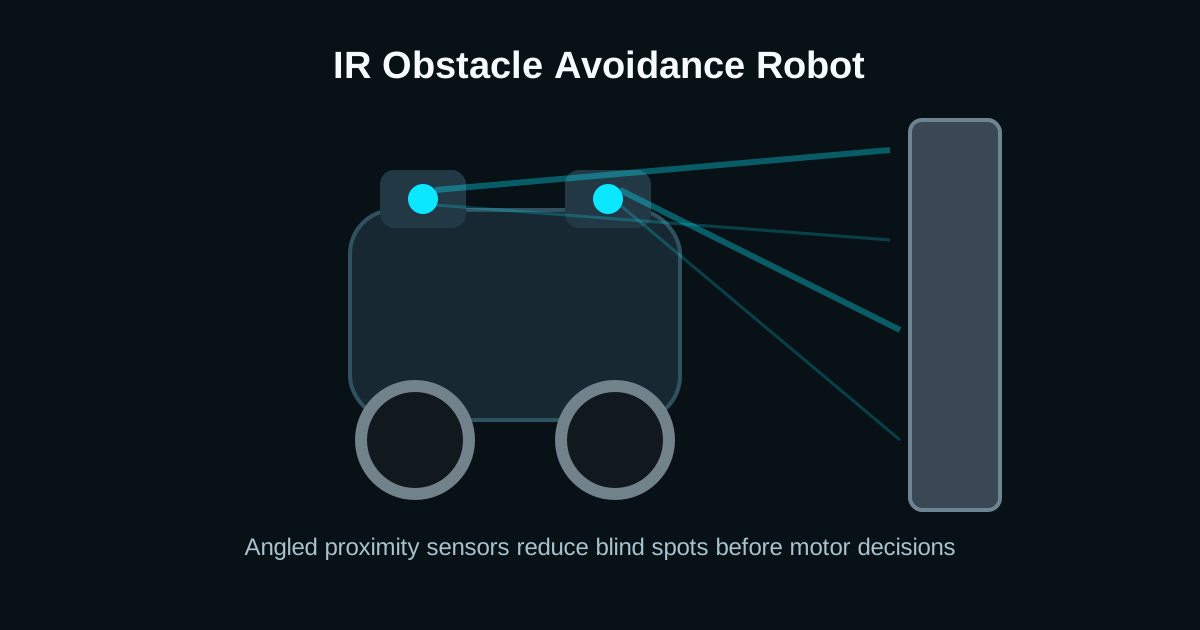
- [Sensor angle] [controls] [front and side blind spots]
- [Motor decision logic] [turns] [the robot away from detected obstacles]
Sensor Placement: Avoid the Straight-Ahead Trap
A single front IR module can detect a flat wall, but it fails when the obstacle sits slightly to the side. A better beginner layout uses two sensors mounted near the front corners and angled outward by 15-30 degrees.
For compact robots, keep the sensor face just ahead of the wheels. If the sensor is buried behind a bumper, the robot will detect obstacles only after the chassis is already touching them.
- Left sensor triggered: reverse briefly, then turn right.
- Right sensor triggered: reverse briefly, then turn left.
- Both sensors triggered: reverse longer, then pivot in the direction with more free space.
Blind Spots and Surface Problems
IR modules do not measure distance like ultrasonic sensors; they compare reflected intensity against a threshold. Dark cloth, black rubber, and sharply angled acrylic can absorb or deflect IR, so the detection range may collapse from 25 cm to only a few centimeters.
Sunlight is the other common failure. It contains enough infrared energy to saturate the receiver. For outdoor robots, use modulated IR sensors, ultrasonic backup, or a physical sun shade over the receiver.
Arduino Decision Logic for Two IR Sensors
The safest first behavior is reverse-then-turn. It prevents the robot from rotating while still physically wedged against an obstacle.
const int leftIR = 2;
const int rightIR = 3;

void loop() {
  bool leftBlocked = digitalRead(leftIR) == LOW;
  bool rightBlocked = digitalRead(rightIR) == LOW;

  if (leftBlocked && rightBlocked) {
    reverse(250);
    pivotRight(350);
  } else if (leftBlocked) {
    reverse(120);
    pivotRight(220);
  } else if (rightBlocked) {
    reverse(120);
    pivotLeft(220);
  } else {
    forward(170);
  }
}
Frequently Asked Questions
Are IR sensors good for obstacle avoidance?
Yes for short-range indoor robots, especially below 30 cm. They are cheap and fast, but they are less reliable than ultrasonic or time-of-flight sensors on dark, shiny, or sunlit surfaces.
Why does my IR robot hit black objects?
Black matte surfaces absorb much of the emitted infrared light, so the receiver may not cross the comparator threshold. Increase sensitivity, move slower, add a third sensor, or combine IR with ultrasonic sensing.
What angle should obstacle sensors use?
A practical starting point is two front-corner sensors angled 15-30 degrees outward. This catches side obstacles early while still overlapping enough to detect front walls.