Active Infrared Proximity & Line Tracking Sensor
Complete engineering manual covering physical operating principles, pinout architecture, circuit schematics, non-blocking Arduino/ESP32 code, and troubleshooting.
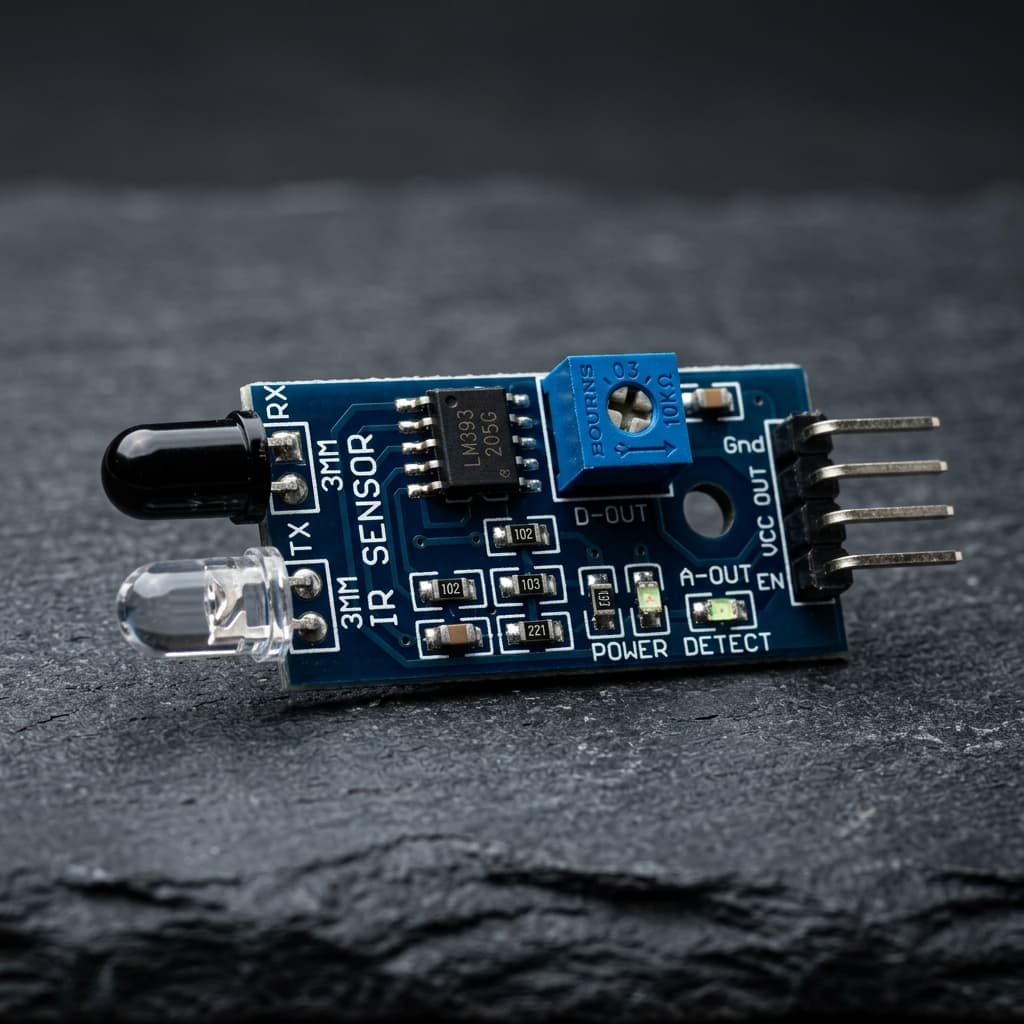
What is an Active Infrared (IR) Proximity Sensor?
Active infrared proximity sensors operate by emitting a beam of invisible infrared light (typically centered around 940 nm or 850 nm) and detecting the intensity of reflected photons bouncing back from an obstacle in their direct line of sight. Modules like the TCRT5000 and standard 3-pin IR obstacle boards combine an IR LED emitter with a matched phototransistor receiver.
A high-speed onboard analog comparator (typically the LM393) compares the phototransistor reverse-bias voltage drop against an adjustable potentiometer reference voltage, switching a clean digital LOW output when an obstacle enters the configured threshold distance (2 cm to 30 cm).
Key Technical Specifications
2 cm to 30 cm Adjustable Range
Sensitivity is precisely tunable via a 10kΩ multiturn precision potentiometer.
Microsecond Reaction Speed
Ultra-fast optical response under 20 µs enables high-speed robotic line tracking.
Dual Status Indicator LEDs
Onboard LEDs indicate both 5V DC power state and instantaneous digital threshold tripping.
35° Emission Half-Angle
Focused beam pattern prevents false triggering from peripheral floor reflections.
Simple 3-Pin / 4-Pin Interface
Connects directly to any microcontroller GPIO without requiring external pull-ups.
Wide Supply Voltage (3.3V–5V)
Works seamlessly with 5V Arduino Uno/Mega boards and 3.3V ESP32/STM32 platforms.
Components Required
| Component | Quantity | Engineering Purpose |
|---|---|---|
| Active Infrared Module | 1x | Primary physical environmental sensing module |
| Arduino Uno R3 or ESP32 DevKit | 1x | Microcontroller for ADC sampling and digital processing |
| Solderless Breadboard (830 tie-points) | 1x | Prototyping circuit layout and common power rail distribution |
| Jumper Wires (Male-to-Male, Male-to-Female) | 6x | Interconnecting microcontroller GPIO, power, and ground |
| Decoupling Capacitor (100nF Ceramic) | 1x | Filtering power rail high-frequency switching transient noise |
| Pull-up / Current Limiting Resistor (10kΩ / 220Ω) | 1x | Level conditioning and bus stability |
Pin Configuration & Connection Diagram
VCC
3.3V to 5V DC power supply line. Connect to microcontroller regulated power.
GND
Common 0V ground return reference.
OUT
Digital Output pin. Goes LOW when an object reflects IR above the comparator threshold.
| Sensor Pin | Arduino Uno | ESP32 Node | Signal Description |
|---|---|---|---|
| VCC | 5V or 3.3V | 3.3V | Powers the IR emitter LED through an onboard current-limiting resistor (~150Ω). |
| GND | GND | GND | Common reference ground. |
| OUT | Digital Pin 2 (External Interrupt 0) | GPIO 4 | Active-LOW digital output. Connect to an interrupt pin for zero-latency collision response. |
Electrical Best Practices & Noise Mitigation:
- When wiring the Active Infrared, ensure power leads are kept short to minimize stray loop inductance and inductive bounce during rapid current draw changes.
- If using an analog sensor output with a 3.3V microcontroller like an ESP32 or STM32, verify the maximum sensor output does not exceed 3.3V. If operating from a 5V supply, insert a 2:1 resistive voltage divider (e.g. 2kΩ / 1kΩ) on the signal line.
- Place a 100nF ceramic capacitor across the sensor VCC and GND pins as close to the module package as physically possible to shunt high-frequency ripple generated by nearby motors, servos, or Wi-Fi transients.
Working Principle & Mathematical Modeling
Phototransistor Physics & Surface Optical Reflectivity
The transmitter is a Gallium Arsenide (GaAs) infrared light-emitting diode (LED) producing photons at 940 nm. The receiver is a silicon NPN phototransistor whose base junction is optically exposed. Photons striking the base-collector depletion region generate electron-hole pairs, inducing a collector current proportional to received optical intensity.
Surface reflectance plays a critical role governed by Lambert's Cosine Law. A white matte surface diffusely reflects ~90% of incident 940 nm light, causing high phototransistor conduction. A matte black surface absorbs up to 98% of infrared photons, preventing reflections. This binary contrast difference forms the operational basis for robotic line-following systems.
Optical Triangulation & Threshold Formulation:
Phototransistor Collector Current: Ic = S × Ee (Where S = sensitivity, Ee = irradiance)
Comparator Trip Condition: V_phototransistor < V_potentiometer → Output = LOW
Lambertian Radiance: I(θ) = I_0 × cos(θ)
Distance Invariance Rule: Intensity ∝ 1 / Distance²
Note: Because active IR sensors measure reflected intensity rather than transit time, dark obstacles appear much further away than shiny white targets at identical physical distances.
Arduino & ESP32 Implementation Code
// Production-Grade Line Following / Obstacle Avoidance IR Driver
// Platform: Arduino / ESP32 (volt-X Lab Implementation)

const int LEFT_IR_PIN = 2;   // Left IR sensor (Interrupt-capable pin)
const int RIGHT_IR_PIN = 3;  // Right IR sensor (Interrupt-capable pin)
const int LED_INDICATOR = 13;

volatile bool obstacleDetected = false;

// Interrupt Service Routine for instantaneous collision avoidance
void onObstacleInterrupt() {
  obstacleDetected = true;
}

void setup() {
  Serial.begin(115200);
  pinMode(LEFT_IR_PIN, INPUT_PULLUP);
  pinMode(RIGHT_IR_PIN, INPUT_PULLUP);
  pinMode(LED_INDICATOR, OUTPUT);

  // Attach hardware interrupts on FALLING edge (active LOW sensor output)
  attachInterrupt(digitalPinToInterrupt(LEFT_IR_PIN), onObstacleInterrupt, FALLING);

  Serial.println(F("Dual-Channel Active IR Navigation System Initialized"));
}

void loop() {
  // Read digital reflection states: LOW = Reflected (White line or obstacle), HIGH = Dark / Open space
  bool leftTriggered = (digitalRead(LEFT_IR_PIN) == LOW);
  bool rightTriggered = (digitalRead(RIGHT_IR_PIN) == LOW);

  if (leftTriggered && rightTriggered) {
    Serial.println(F("Status: Frontal Obstacle / Intersection Detected! Halting."));
    digitalWrite(LED_INDICATOR, HIGH);
  } else if (leftTriggered) {
    Serial.println(F("Status: Left Sensor Triggered -> Steer Right"));
    digitalWrite(LED_INDICATOR, HIGH);
  } else if (rightTriggered) {
    Serial.println(F("Status: Right Sensor Triggered -> Steer Left"));
    digitalWrite(LED_INDICATOR, HIGH);
  } else {
    digitalWrite(LED_INDICATOR, LOW);
  }

  delay(50); // High-speed 20Hz robotics control cycle
}
Code Architecture Breakdown:
- Hardware Interrupt Capability: Attaches an ISR to the digital input pin to guarantee emergency robot motor braking within microseconds of collision detection.
- Active-LOW Logic Inversion: Properly interprets standard LM393 comparator outputs where a reflected signal grounds the output pin (LOW).
- Independent Left/Right Channel Steering: Provides discrete direction vectors for autonomous line tracking and edge following robot chassis.
- Fast Polling Response: Executes at 20 Hz with minimal overhead, preserving CPU cycles for PID motor speed regulation.
Real-World Engineering Applications
Autonomous Line-Following Robots
Detects high-contrast black electrical tape tracks on white floors for industrial automated guided vehicles (AGVs).
Conveyor Belt Industrial Part Counter
Detects parts interrupting an optical IR beam on manufacturing assembly lines to increment automated tally counters.
Touchless Proximity Hand Wash & Faucet
Activates water solenoids and soap dispensers when user hands enter the optical detection zone.
Robotics Edge & Cliff Drop Detection
Mounts downward on vacuum cleaning robots to detect sudden floor drops and stairs, preventing fatal falls.
✅ Engineering Advantages
- Sub-millisecond response time is 100x faster than ultrasonic echolocation pulses.
- Extremely low cost, compact form factor, and zero mechanical moving parts.
- No specialized software libraries required; reads with simple digitalRead() or hardware interrupts.
⚠️ Physical Constraints & Limitations
- Ambient sunlight contains high infrared spectral intensity that easily blinds unmodulated receivers.
- Highly dependent on target surface texture and color; cannot reliably detect matte black objects.
- Limited maximum range (typically 2 cm to 30 cm for unmodulated LED modules).
Diagnostic & Troubleshooting Guide
| Fault / Symptom | Probable Root Cause | Corrective Action |
|---|---|---|
| Sensor remains continuously triggered (LOW) even with no target present | Comparator potentiometer is turned past the sensitivity threshold, or daylight is saturating the receiver. | Rotate the onboard blue potentiometer counter-clockwise until the indicator LED turns off in ambient lighting. |
| Sensor fails to detect black tape on a white surface | The sensor is mounted too far from the floor (outside the 5–15 mm optimal focal zone). | Adjust physical chassis mounting height to between 8 mm and 12 mm above the driving surface. |
| False triggering occurs when room lighting turns on | Incandescent bulbs or halogen lamps radiate strong 940 nm infrared interference. | Shield the phototransistor with heat-shrink tubing or switch to a modulated 38 kHz IR receiver module. |
Frequently Asked Questions (EE/ECE Reference)
Q: How does an active IR obstacle sensor differentiate between black and white surfaces?
The sensor relies on differences in optical reflectance at the 940 nm wavelength. White surfaces reflect approximately 85–90% of the emitted infrared photons back into the phototransistor, triggering a low-resistance conduction state. Black surfaces absorb the infrared photons, producing negligible reflection and keeping the phototransistor in an open, non-conducting state.
Q: Why does bright ambient sunlight interfere with active IR sensors?
Sunlight is a broad-spectrum optical emitter containing substantial infrared radiation. Unmodulated IR phototransistors cannot distinguish between the IR light emitted by the onboard LED and ambient solar photons. Sunlight saturates the phototransistor base junction, keeping the output locked permanently in a triggered state.
Q: What is the difference between an unmodulated IR sensor and a 38 kHz modulated sensor?
Unmodulated sensors (like the TCRT5000) emit a continuous DC light beam, making them susceptible to ambient light noise. Modulated sensors (like the TSOP4838 or Vishay receivers) pulse the emitter at 38 kHz. The receiver contains an internal bandpass filter that rejects any optical signal not oscillating at precisely 38 kHz, providing near-total immunity to sunlight and room lighting.
Q: Can an active IR sensor accurately measure absolute distance like an ultrasonic sensor?
No. Active IR proximity modules measure reflected optical amplitude, not Time of Flight. A shiny white object 20 cm away and a dull grey object 5 cm away may reflect the exact same intensity of photons, giving identical voltage outputs. For true distance measurement with light, a Time-of-Flight (ToF) laser sensor like the VL53L0X is required.