
The Physics of Infrared Detection
Infrared light occupies the electromagnetic spectrum just below visible red (700nm to 1mm). The human eye cannot see it, but silicon phototransistors are highly sensitive in the 850–950nm range. An IR LED emitting at 940nm is practically invisible to humans, making IR the ideal choice for discreet sensing applications.
The fundamental principle of reflective IR sensing: the emitter constantly floods the detection zone with IR light. Nearby objects reflect this light back to the receiver. The further an object, the less reflected light reaches the receiver (following the inverse square law). A comparator circuit sets a threshold — above which an obstacle is detected.
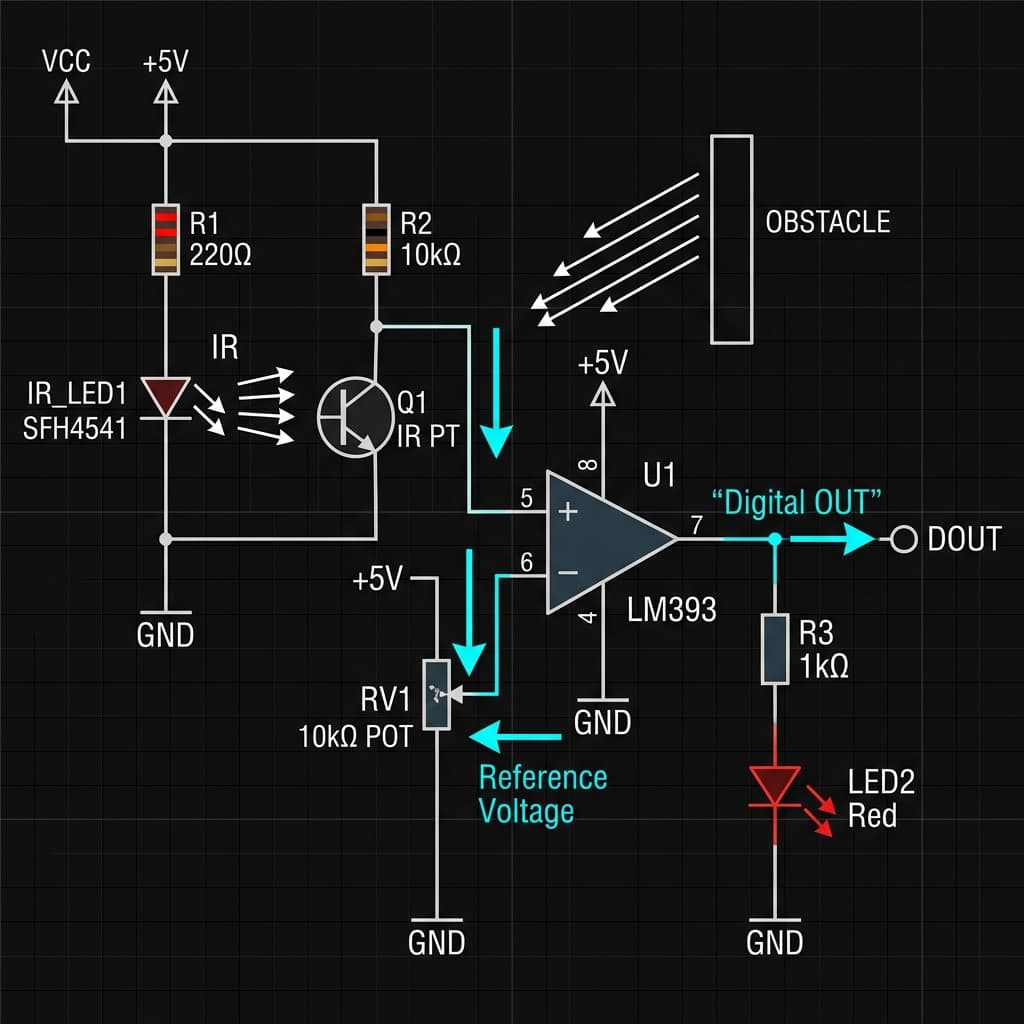
Fig 1: Active IR Sensor Circuit — IR emitter LED, phototransistor receiver, LM393 voltage comparator, and threshold tuning potentiometer
Types of IR Sensors
Reflective IR (Active)
Line following, proximity, obstacle avoidance. Emits + detects reflected IR.
Break-Beam IR
Object counting, position detection. Detects when beam is interrupted.
PIR (Passive IR)
Motion detection. Detects body heat changes only — no emission.
IR Remote Receiver
Decodes 38kHz modulated IR remote control signals from TVs, ACs.
Arduino Line-Following Robot with TCRT5000
The TCRT5000 outputs a digital HIGH when over a white/reflective surface, and LOW when over a black/non-reflective line. Mount two sensors side by side:
// 2-sensor IR line follower
// IR module OUT pin: LOW = white surface, HIGH = black line

const int LEFT_IR = 2;   // Left TCRT5000 digital output
const int RIGHT_IR = 3;  // Right TCRT5000 digital output
const int LEFT_FWD = 5, LEFT_BWD = 6;   // Left motor PWM
const int RIGHT_FWD = 9, RIGHT_BWD = 10; // Right motor PWM

void setup() {
  pinMode(LEFT_IR, INPUT);
  pinMode(RIGHT_IR, INPUT);
  // Motor pins setup...
}

void loop() {
  bool leftLine = digitalRead(LEFT_IR);   // HIGH = on black line
  bool rightLine = digitalRead(RIGHT_IR);

  if (!leftLine && !rightLine) {
    // Both on white = go straight
    analogWrite(LEFT_FWD, 180); analogWrite(RIGHT_FWD, 180);

  } else if (leftLine && !rightLine) {
    // Left on line = turn left
    analogWrite(LEFT_FWD, 80); analogWrite(RIGHT_FWD, 180);

  } else if (!leftLine && rightLine) {
    // Right on line = turn right
    analogWrite(LEFT_FWD, 180); analogWrite(RIGHT_FWD, 80);

  } else {
    // Both on line = stop (junction)
    analogWrite(LEFT_FWD, 0); analogWrite(RIGHT_FWD, 0);
  }
}
PIR Motion Sensors: Passive Infrared Explained
PIR sensors detect changes in ambient infrared radiation caused by warm bodies (humans at ~37°C emit significant IR at 9–10µm wavelength). A Fresnel lens focuses this IR onto a pyroelectric sensor element — when a person moves across the field of view, the differential IR causes a voltage spike that triggers the output pin.
The HC-SR501 has two key adjustments:
- Sensitivity potentiometer: Adjusts detection range from 3m to 7m.
- Delay potentiometer: How long the output stays HIGH after detection (5s to 5min).
- Jumper (H/L mode): Retriggerable (H) re-extends the timer on each detection; Single-trigger (L) waits for timeout before re-triggering.
Frequently Asked Questions
How does an IR sensor work?
An IR sensor emits infrared light via an IR LED and detects reflected intensity with a phototransistor. More reflected light (closer object) = higher phototransistor current. A comparator converts this to a digital HIGH/LOW obstacle detected signal.
What is the difference between an IR sensor and a PIR sensor?
Active IR sensors emit IR and detect reflections for proximity/obstacle sensing. PIR sensors are passive — they detect changes in body heat radiation from humans/animals for motion detection, without emitting anything.
What is a TCRT5000 and what is it used for?
The TCRT5000 is a reflective optical sensor with 940nm IR LED and phototransistor in one package, detecting surface reflectivity at 0–15mm. Used in line-following robots where black lines absorb IR (LOW) and white surfaces reflect IR (HIGH).
Why does sunlight interfere with IR sensors?
Sunlight contains strong IR that saturates phototransistors, blocking obstacle detection. Solution: use 38kHz modulated IR with bandpass receivers (like TV remotes) that only respond to the specific modulation frequency, rejecting DC ambient IR.
What is the range of an IR obstacle detection sensor?
Standard IR obstacle modules detect 2–30cm (adjustable via potentiometer). Sharp GP2Y0A21 measures 10–80cm. GP2Y0A02 up to 150cm. Dark matte surfaces significantly reduce effective range versus white reflective ones.
📚 References & Sources
Related Resources
Hall Effect Sensors
Magnetic sensors that complement IR for position detection.
MPU6050 IMU Guide
Combine IR obstacle sensing with IMU data for stable robot navigation.
How H-Bridges Work
The motor driver circuit controlled by IR sensor outputs.
Servo Motor Principle
Servo control for IR-sensor guided mechanical arms.