🚦 Smart Traffic Light System
Simulate a real intersection with timed red-yellow-green cycles and an optional pedestrian button.
Overview
Traffic lights are a perfect real-world model for learning state machines. Each light (Red, Yellow, Green) represents a state, and transitions happen on a timer — or when a button is pressed.
What you'll learn: Multiple digital outputs, timing sequences, button input with debouncing, and basic state machine logic.
Estimated time: 45–60 minutes. Difficulty: ⭐⭐ Easy.
Components Needed
| Component | Specification | Qty | Notes |
|---|---|---|---|
| Arduino Uno R3 | ATmega328P, 5V | 1 | |
| Red LED | 5mm, 2V 20mA | 1 | |
| Yellow LED | 5mm, 2V 20mA | 1 | |
| Green LED | 5mm, 2V 20mA | 1 | |
| Resistors | 220 Ohm | 3 | One per LED |
| Push Button | Momentary SPST | 1 | Pedestrian button |
| Resistor | 10k Ohm pull-down | 1 | For button |
| Breadboard + Wires | Standard | 1 |
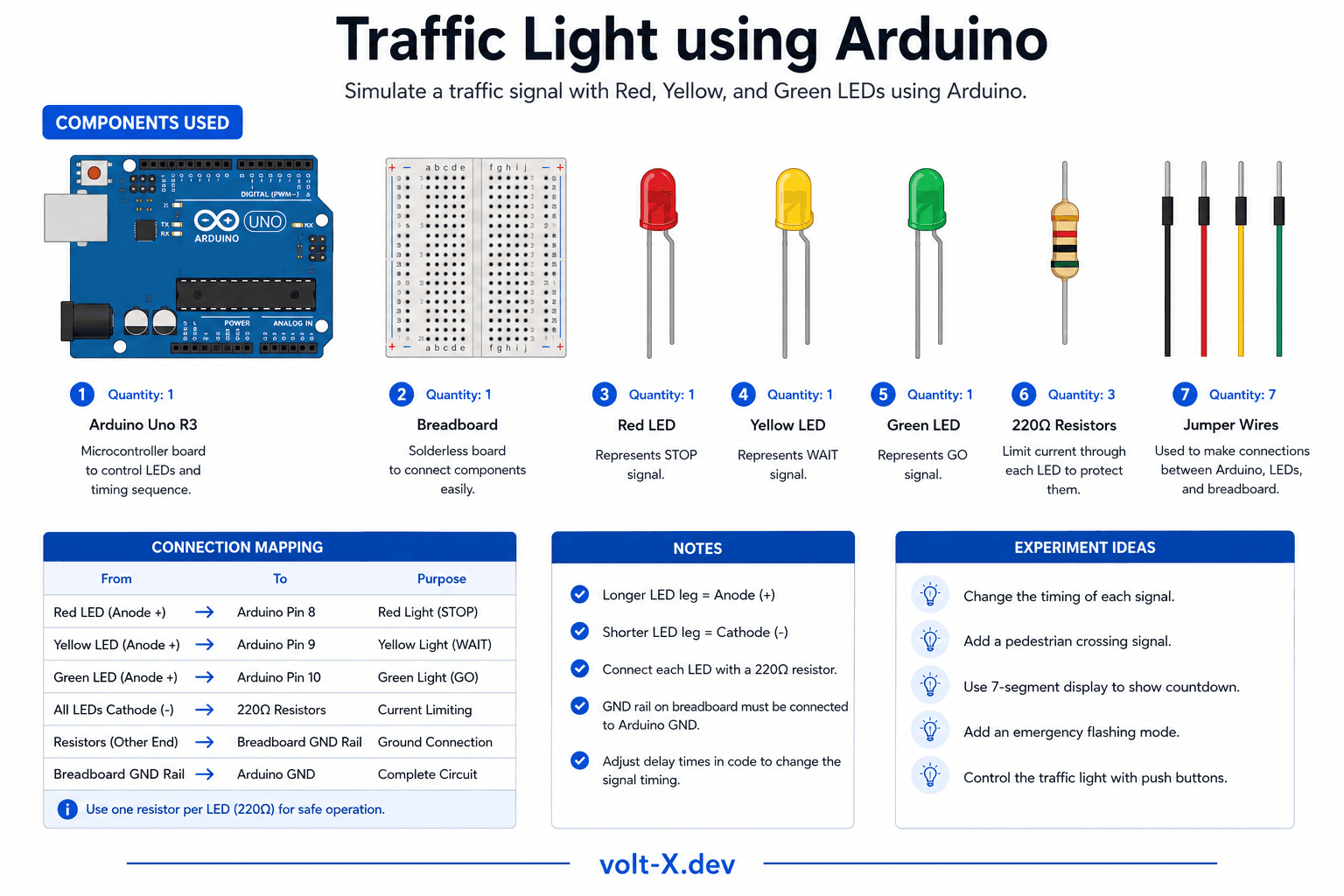
Component Pin Mapping
Step-by-Step Tutorial
1
Place the LEDs
Insert Red, Yellow, and Green LEDs into the breadboard vertically with spacing between each.
2
Add Resistors
Wire a 220 Ohm resistor from each LED cathode (short leg) to GND rail.
3
Connect to Arduino
Red -> Pin 8, Yellow -> Pin 9, Green -> Pin 10.
4
Add Button
Connect button between pin 2 and 5V. Add 10k Ohm pull-down resistor from pin 2 to GND.
5
Upload and Test
Upload the code. Normal cycle runs automatically. Press button to trigger pedestrian signal (green held, then red).
The pedestrian button uses a pull-down resistor to keep the pin at LOW by default. Without it, the pin floats and gives random readings.
Arduino Code
traffic_light.ino
INO
// Smart Traffic Light — Volt X
const int RED = 8, YELLOW = 9, GREEN = 10;
const int BUTTON = 2;

void setup() {
  pinMode(RED, OUTPUT);
  pinMode(YELLOW, OUTPUT);
  pinMode(GREEN, OUTPUT);
  pinMode(BUTTON, INPUT);
}

void setLight(int r, int y, int g) {
  digitalWrite(RED, r);
  digitalWrite(YELLOW, y);
  digitalWrite(GREEN, g);
}

void loop() {
  // Green phase
  setLight(LOW, LOW, HIGH);
  for (int i = 0; i < 50; i++) {
    if (digitalRead(BUTTON) == HIGH) break;
    delay(100);
  }
Reviews & Ratings
—0 reviews
Sign in to leave a review
Loading reviews...