🌡️ Room Temperature Monitor
Read real-world temperature and humidity with a DHT11 sensor and display live readings via the Serial Monitor.
Overview
The DHT11 is a remarkably accurate sensor that measures both temperature and humidity using a single digital pin. At under $2, it's one of the best value sensors in electronics.
What you'll learn: Including libraries, reading sensor data, printing to Serial Monitor, and understanding digital communication protocols.
Estimated time: 20–30 minutes. Difficulty: ⭐ Beginner-friendly.
Components Needed
| Component | Specification | Qty | Notes |
|---|---|---|---|
| Arduino Uno R3 | ATmega328P, 5V | 1 | Any Uno-compatible board works |
| DHT11 Sensor | 3.3???5V, +/-2 deg C accuracy | 1 | DHT22 also works (more accurate) |
| Resistor | 10k Ohm pull-up | 1 | Between data pin and VCC |
| Breadboard | 400 tie-points min | 1 | Half-size is fine |
| Jumper Wires | Male-to-Male | ~5 | Various lengths |
| USB Cable | Type A to B | 1 | For uploading code |
Component Pin Mapping
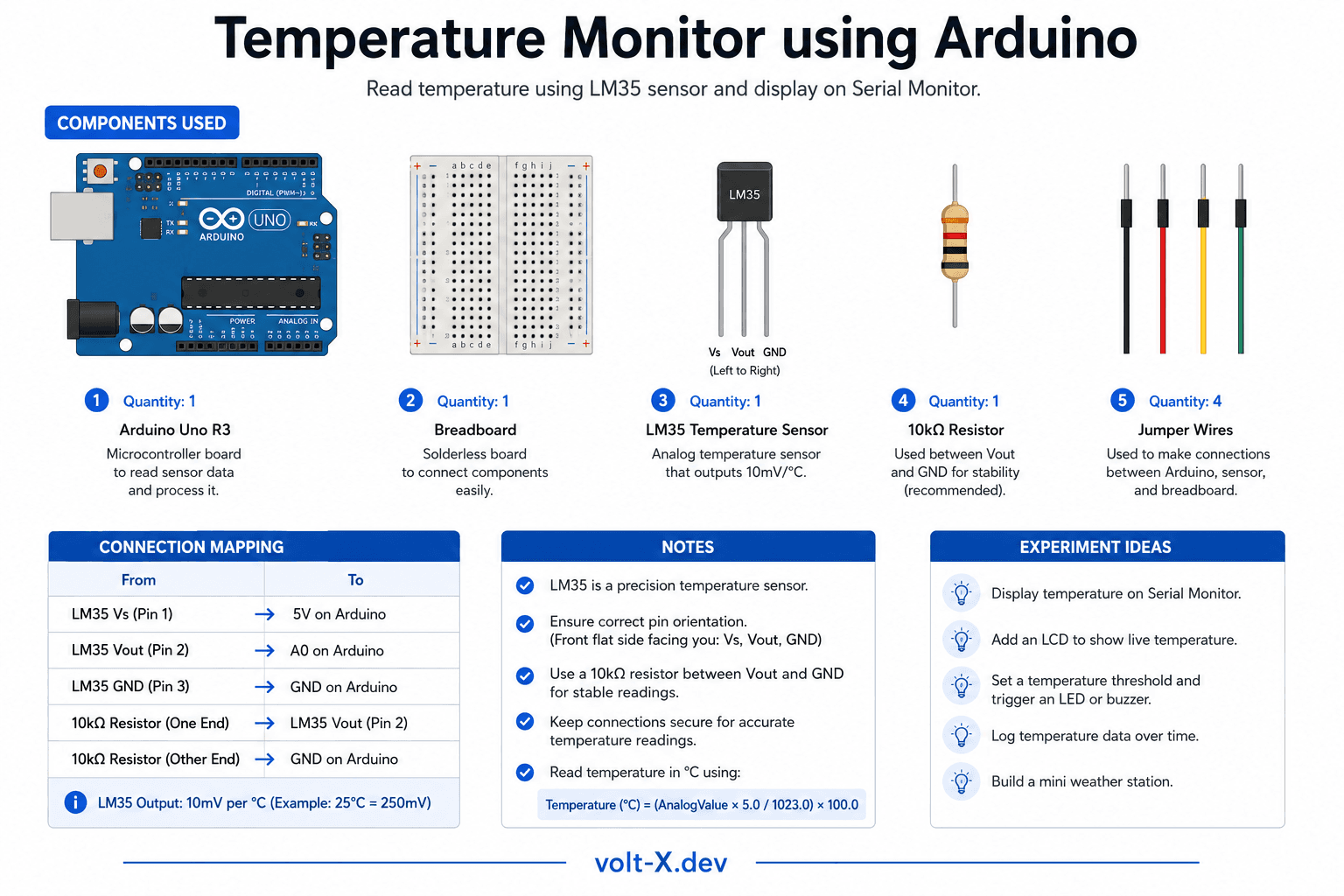
Step-by-Step Tutorial
1
Install DHT Library
Open Arduino IDE -> Sketch -> Include Library -> Manage Libraries. Search for
DHT sensor library by Adafruit and install it along with Adafruit Unified Sensor.2
Wire the DHT11
DHT11 has 3 useful pins: VCC -> Arduino 5V, GND -> Arduino GND, DATA -> Arduino digital pin
2.3
Add Pull-up Resistor
Connect a
10k Ohm resistor between the DATA pin and VCC (5V). This ensures reliable signal levels.4
Upload the Code
Paste the code below, select your board, and click Upload.
5
Open Serial Monitor
Go to Tools -> Serial Monitor, set baud rate to
9600. Temperature and humidity readings will appear every 2 seconds.The DHT11 needs at least 1–2 seconds between readings. Reading it faster can cause errors or incorrect values.
Arduino Code
temperature_monitor.ino
INO
// Room Temperature Monitor — Volt X
#include <DHT.h>

#define DHTPIN 2
#define DHTTYPE DHT11

DHT dht(DHTPIN, DHTTYPE);

void setup() {
  Serial.begin(9600);
  dht.begin();
  Serial.println("Volt X — Temperature Monitor");
}

void loop() {
  delay(2000);
  float humidity = dht.readHumidity();
  float tempC = dht.readTemperature();

  if (isnan(humidity) || isnan(tempC)) {
    Serial.println("Sensor read error!");
    return;
  }

Serial.print("Temperature: ");Reviews & Ratings
—0 reviews
Sign in to leave a review
Loading reviews...