🤖 Servo Sweeper Bot
Make a servo motor sweep back and forth like a radar scanner using the Servo library.
Overview
Servo motors are precision actuators that rotate to exact angles. The Arduino Servo library makes them simple to control — just tell it what angle you want (0–180°) and it goes there.
What you'll learn: Servo library, attach(), write(), angle control, and PWM signals.
Estimated time: 20–30 minutes. Difficulty: ⭐ Beginner-friendly.
Components Needed
| Component | Specification | Qty | Notes |
|---|---|---|---|
| Arduino Uno R3 | 5V | 1 | |
| SG90 Servo Motor | 0???180??, 5V | 1 | Or MG90S for more torque |
| Breadboard + Wires | Half-size | 1 | |
| USB Cable | Type A to B | 1 |
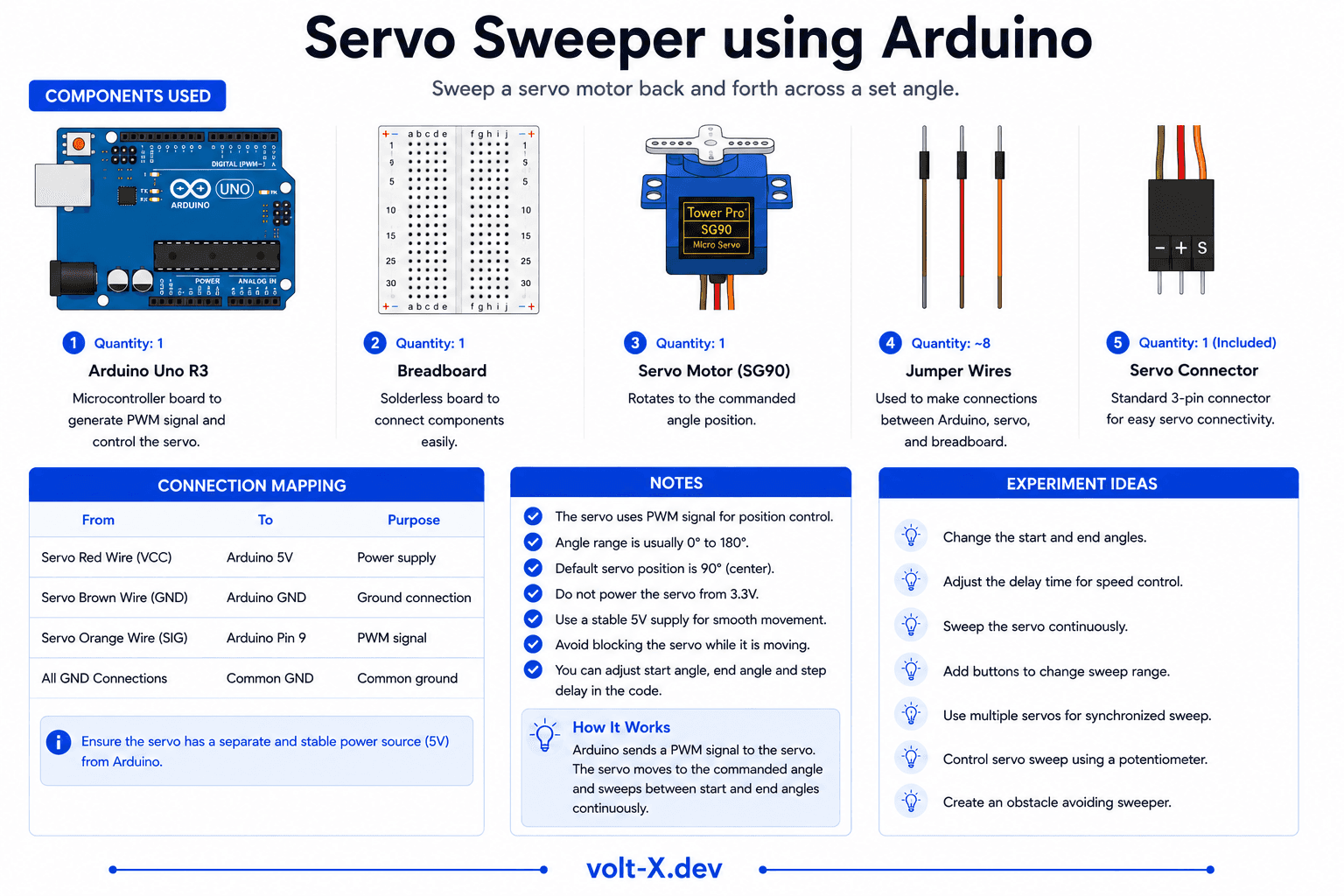
Component Pin Mapping
Step-by-Step Tutorial
1
Connect the Servo
Servo has 3 wires: Brown/Black -> GND, Red -> 5V, Orange/Yellow -> pin 9.
2
Upload the Code
The Servo library is built into Arduino IDE. No installation needed.
3
Watch It Sweep
The servo will sweep from 0?? to 180?? and back continuously.
4
Control with a Potentiometer
Replace the auto-sweep with
analogRead(A0) mapped to 0???180 to control angle manually.Powering a servo directly from the Arduino 5V pin is fine for SG90 (light load). For stronger servos, use an external 5V supply to avoid browning out the Arduino.
Arduino Code
servo_sweeper.ino
INO
// Servo Sweeper — Volt X
#include <Servo.h>

Servo myServo;
int angle = 0;
int step = 2;

void setup() {
  myServo.attach(9);
}

void loop() {
  myServo.write(angle);
  delay(20);

  angle += step;
  if (angle >= 180 || angle <= 0) {
    step = -step; // Reverse direction
  }
}Reviews & Ratings
—0 reviews
Sign in to leave a review
Loading reviews...