🌈 RGB LED Mood Lamp
Mix Red, Green, and Blue light to create any color in the rainbow with an RGB LED.
Overview
An RGB LED is actually three LEDs in one package. By controlling the intensity of each using PWM, you can create colors like purple, orange, or teal.
What you'll learn: RGB color theory, PWM arrays, and multi-variable control.
Estimated time: 25-35 minutes. Difficulty: ⭐ Beginner-friendly.
Components Needed
| Component | Specification | Qty | Notes |
|---|---|---|---|
| Arduino Uno R3 | 5V | 1 | |
| RGB LED | Common Cathode | 1 | |
| Resistors | 220Ohm | 3 | One for each color pin |
| Breadboard + Wires | Half-size | 1 |
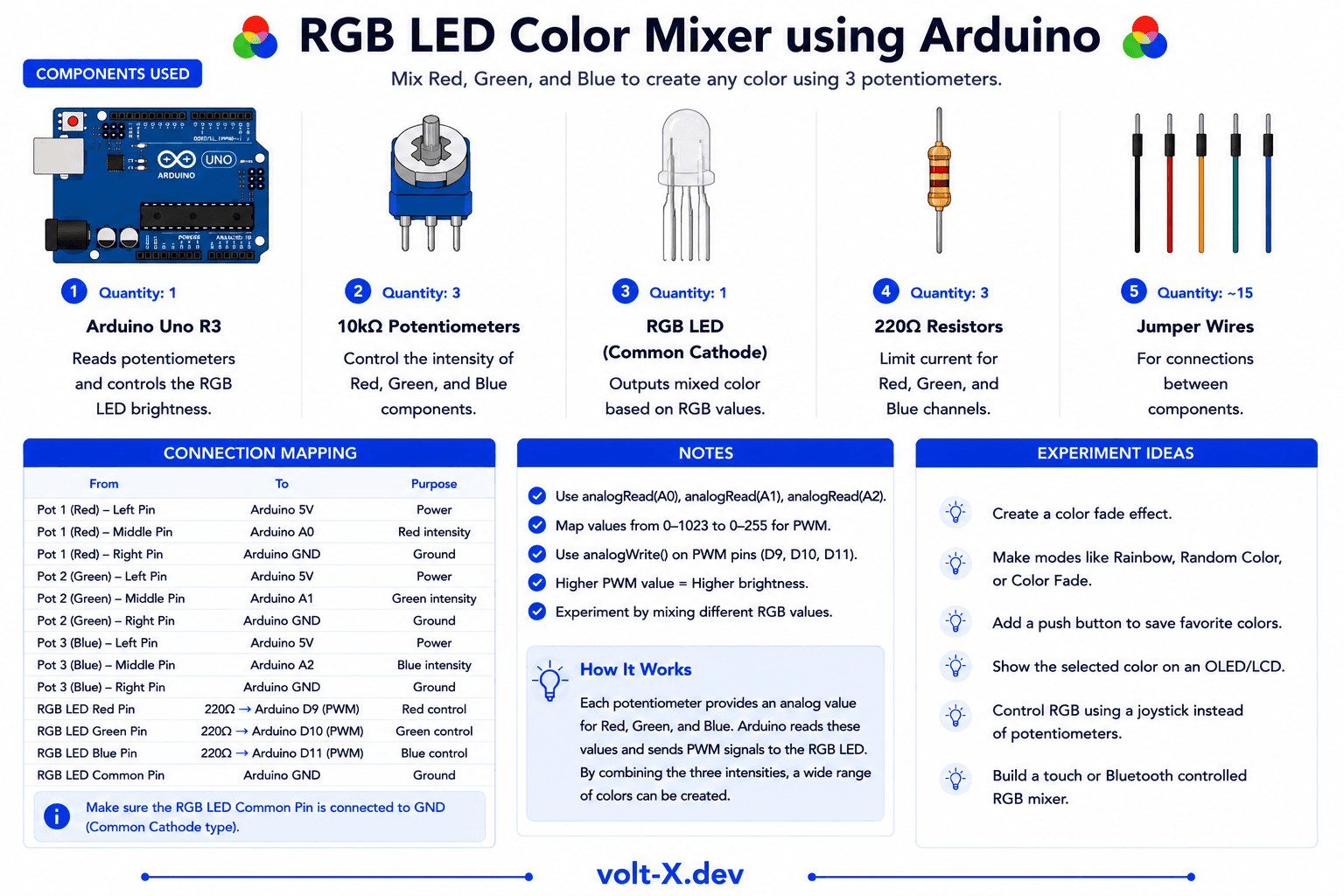
Component Pin Mapping
Step-by-Step Tutorial
1
Identify Pins
The longest pin is the GND (Common Cathode). The other three are R, G, and B.
2
Wire to PWM
R → Pin 9, G → Pin 10, B → Pin 11 via 220Ohm resistors. Longest pin to GND.
3
Upload Color Cycle
Upload the code to watch a smooth rainbow transition.
4
Pick Your Color
Try modifying the
setColor(r, g, b) values in the loop to find your favorite hue.Common Anode RGB LEDs exist too! If yours is common anode, connect the longest pin to 5V and use 255-value in
analogWrite to set colors.Arduino Code
rgb_mixer.ino
INO
// RGB Mood Lamp : Volt X
const int redPin = 9;
const int greenPin = 10;
const int bluePin = 11;

void setup() {
  pinMode(redPin, OUTPUT);
  pinMode(greenPin, OUTPUT);
  pinMode(bluePin, OUTPUT);
}

void setColor(int r, int g, int b) {
  analogWrite(redPin, r);
  analogWrite(greenPin, g);
  analogWrite(bluePin, b);
}

void loop() {
  // Red to Green
  for(int i=0; i<255; i++) { setColor(255-i, i, 0); delay(10); }
  // Green to Blue
  for(int i=0; i<255; i++) { setColor(0, 255-i, i); delay(10); }
  // Blue to Red
  for(int i=0; i<255; i++) { setColor(i, 0, 255-i); delay(10); }
}Reviews & Ratings
—0 reviews
Sign in to leave a review
Loading reviews...