🔦 Light-Sensitive Night Lamp
An LED that turns on automatically when the room goes dark — your first taste of analog sensing and automation.
Overview
An LDR (Light Dependent Resistor) changes its resistance based on light levels. In the dark, resistance goes high; in bright light, resistance drops. Arduino reads this as an analog voltage.
What you'll learn: analogRead(), voltage dividers, threshold comparison, and automatic control logic.
Estimated time: 25–35 minutes. Difficulty: ⭐ Beginner-friendly.
Components Needed
| Component | Specification | Qty | Notes |
|---|---|---|---|
| Arduino Uno R3 | 5V | 1 | |
| LDR (Photoresistor) | GL5516 or similar | 1 | |
| Resistor | 10k Ohm | 1 | Voltage divider partner |
| LED | 5mm | 1 | Output indicator |
| Resistor | 220 Ohm | 1 | For LED |
| Breadboard + Wires | Half-size | 1 |
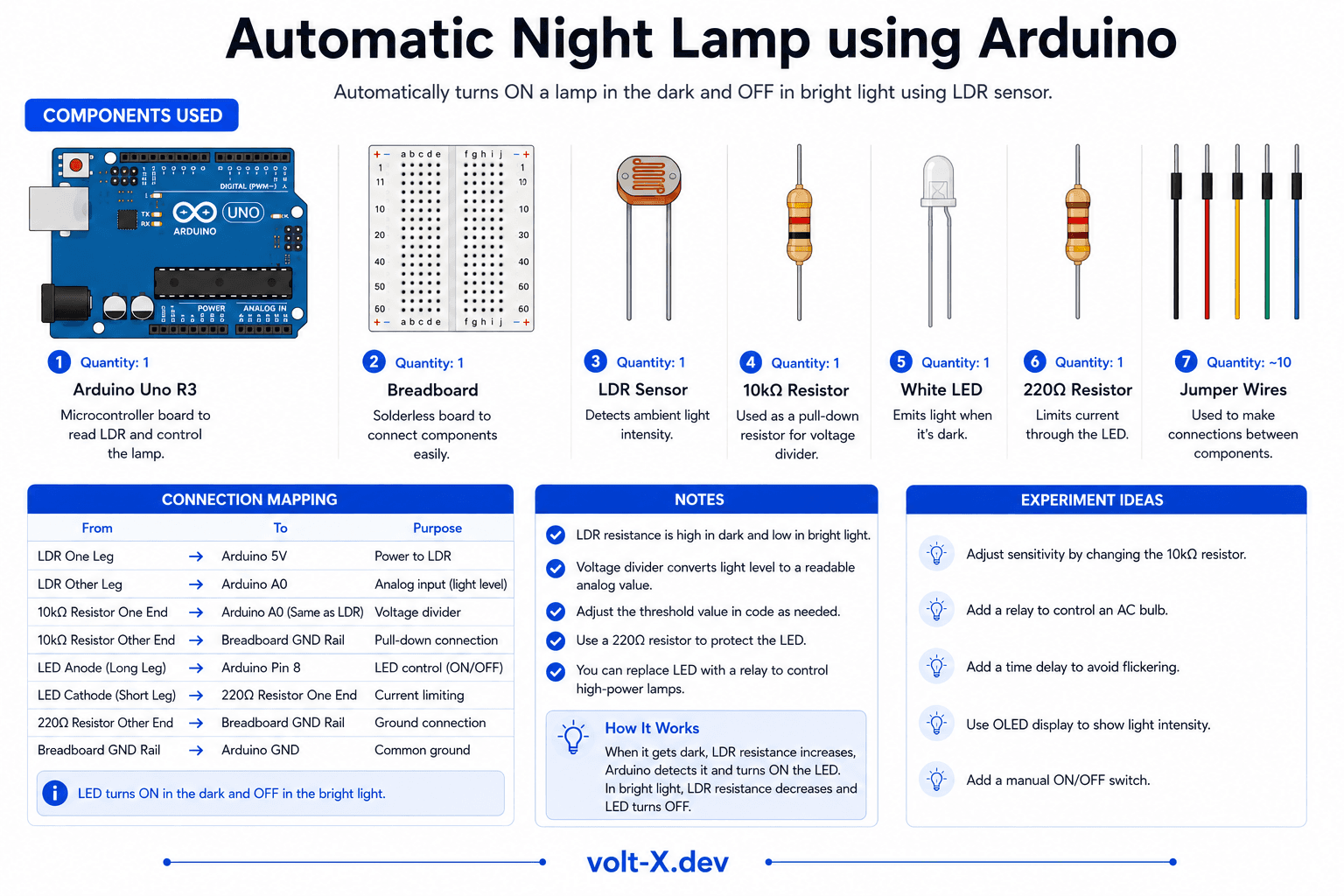
Component Pin Mapping
Step-by-Step Tutorial
1
Build the Voltage Divider
Connect LDR between 5V and analog pin A0. Connect a 10k Ohm resistor between A0 and GND. This creates a voltage divider.
2
Wire the LED
LED anode -> Arduino pin 9 via 220 Ohm resistor. LED cathode -> GND.
3
Upload and Test
Upload code. Cover the LDR with your hand -> LED turns on. Shine a flashlight at it -> LED turns off.
4
Calibrate the Threshold
Open Serial Monitor and check the analog values in different lighting conditions. Adjust the
threshold variable to match your room.The threshold value (500 by default) depends on your ambient lighting. Print sensor values in setup() to find the right threshold for your environment.
Arduino Code
night_lamp.ino
INO
// Night Lamp — Volt X
const int ldrPin = A0;
const int ledPin = 9;
int threshold = 500; // Adjust for your lighting

void setup() {
  pinMode(ledPin, OUTPUT);
  Serial.begin(9600);
}

void loop() {
  int ldrValue = analogRead(ldrPin);
  Serial.println(ldrValue);

  if (ldrValue < threshold) {
    digitalWrite(ledPin, HIGH); // Dark — turn on
  } else {
    digitalWrite(ledPin, LOW);  // Bright — turn off
  }
  delay(100);
}Reviews & Ratings
—0 reviews
Sign in to leave a review
Loading reviews...