🚪 IR Motion Door Alarm
A PIR sensor watches your door. The moment someone walks in, a loud buzzer triggers — your first home security system.
Overview
PIR (Passive Infrared) sensors detect changes in infrared radiation caused by warm bodies moving through their field of view. They output a simple HIGH/LOW digital signal — easy to wire and read.
What you'll learn: PIR sensor usage, digital input reading, buzzer alarm, and LED warning indicators.
Estimated time: 25–35 minutes. Difficulty: ⭐ Beginner-friendly.
Components Needed
| Component | Specification | Qty | Notes |
|---|---|---|---|
| Arduino Uno R3 | 5V | 1 | |
| PIR Sensor (HC-SR501) | 5???20V, adjustable | 1 | Most common PIR sensor |
| Piezo Buzzer | Passive 5V | 1 | |
| Red LED | 5mm | 1 | Alarm indicator |
| Resistor | 220 Ohm | 1 | For LED |
| Breadboard + Wires | Standard | 1 |
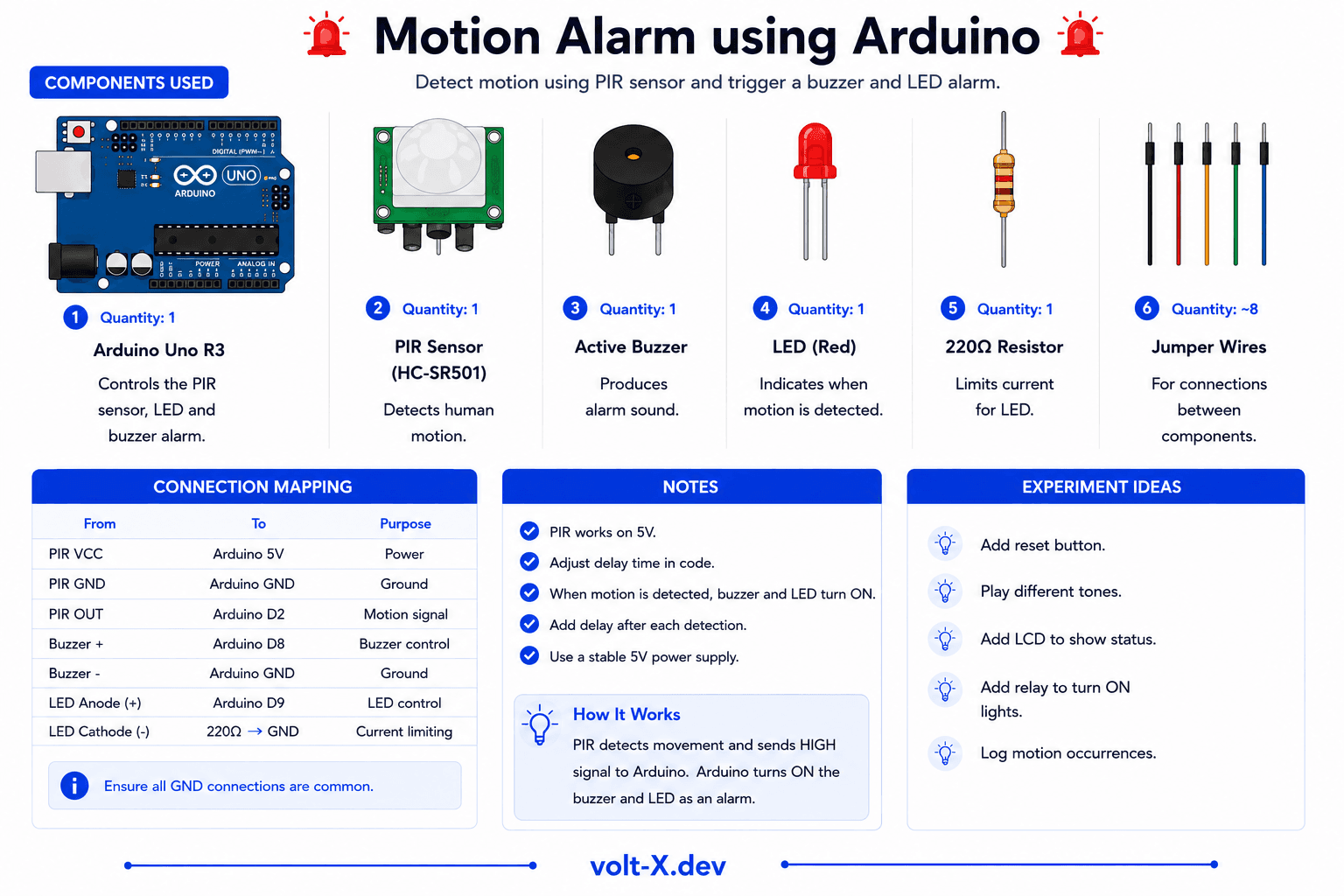
Component Pin Mapping
Step-by-Step Tutorial
1
Connect the PIR
PIR has 3 pins: VCC -> 5V, GND -> GND, OUT -> Arduino pin 2.
2
Add Buzzer and LED
Buzzer+ -> pin 8, LED (with 220 Ohm) -> pin 9, both negatives to GND.
3
Calibration Wait
The HC-SR501 needs 30???60 seconds to calibrate when first powered. Don't move during this time!
4
Test the Alarm
Walk past the sensor from 3???5m away. Buzzer and LED should trigger for a few seconds.
5
Adjust Sensitivity
The PIR has two potentiometers: one for sensitivity (range), one for delay (how long it stays triggered). Adjust with a screwdriver.
Mount the PIR at 2–2.5m height, angled slightly downward. This gives the widest detection zone and minimizes false triggers from pets on the floor.
Arduino Code
motion_alarm.ino
INO
// Motion Door Alarm — Volt X
const int PIR = 2;
const int BUZZER = 8;
const int LED = 9;

void setup() {
  pinMode(PIR, INPUT);
  pinMode(BUZZER, OUTPUT);
  pinMode(LED, OUTPUT);
  Serial.begin(9600);
  Serial.println("Calibrating PIR... wait 30s");
  delay(30000);
  Serial.println("Ready! Watching for motion...");
}

void loop() {
  if (digitalRead(PIR) == HIGH) {
    Serial.println("MOTION DETECTED!");
    digitalWrite(LED, HIGH);
    tone(BUZZER, 2000, 200);
    delay(300);
    tone(BUZZER, 1500, 200);
    delay(300);
    tone(BUZZER, 2000, 200);
delay(300);Reviews & Ratings
—0 reviews
Sign in to leave a review
Loading reviews...