✋ Hand Gesture Distance Control
Control LED brightness or motor speed with your hand position — no buttons, no wires, just gesture and ultrasonic sensing.
Overview
By continuously measuring hand distance with an HC-SR04, we convert physical position into a control value. Moving your hand toward the sensor increases speed or brightness; moving it away decreases it — a simple but intuitive human-machine interface.
Technical Insight: The HC-SR04 delivers accurate readings from 2cm to 400cm. We map the range 5–30cm (a comfortable hand-movement zone) to PWM 0–255 using Arduino's map() and constrain(). A moving average over the last 5 readings smooths noise for a stable response.
In simple terms: Your hand becomes a wireless knob. Hover it 5cm above for full brightness; 30cm away for off. Any position in between gives a proportional output. No physical contact needed.
What you'll learn: HC-SR04 operation and timing, pulseIn(), value smoothing/filtering, map() function, gesture-based HMI design, and analog output from digital sensors.
Estimated time: 30-45 minutes. Difficulty: ⭐⭐ Easy.
Components Needed
| Component | Specification | Qty | Notes |
|---|---|---|---|
| Arduino Uno R3 | 5V | 1 | |
| HC-SR04 Ultrasonic Sensor | 2–400cm, ±3mm | 1 | |
| LED | 5mm | 1 | Brightness controlled by hand |
| Resistor | 220Ω | 1 | For LED |
| 16x2 LCD with I2C | Optional | 1 | Shows distance + brightness % |
| Breadboard + Wires | Half-size | 1 |
Component Pin Mapping
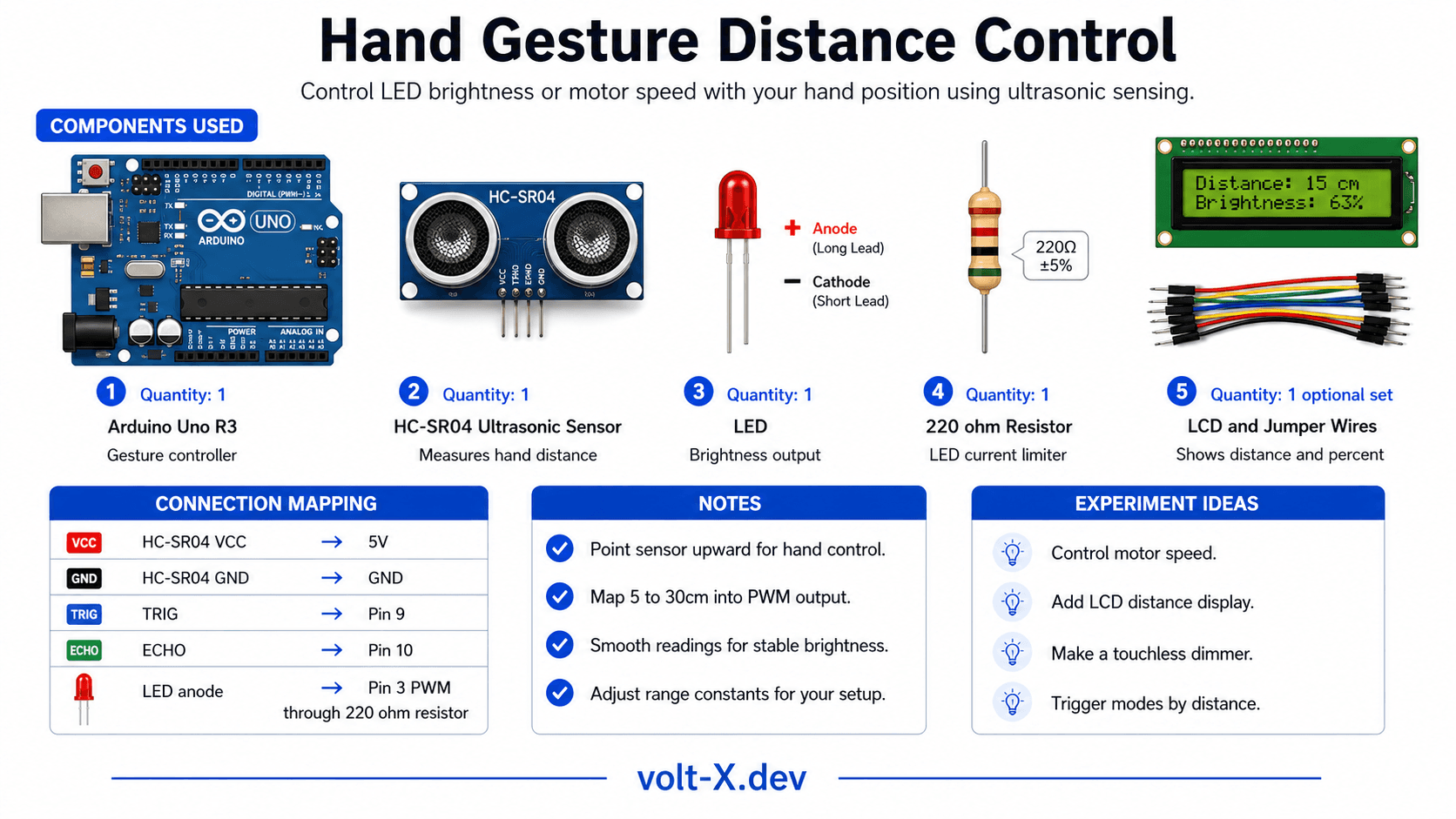
Step-by-Step Tutorial
Wire the HC-SR04
Wire the LED
Upload and Test
Tune the Range
DIST_MIN and DIST_MAX constants for your preferred gesture zone (default: 5–30cm).Control a Motor
analogWrite(LED_PIN, brightness) with a transistor-driven DC motor for speed control instead of brightness.Arduino Code
// Hand Gesture Distance Control — Volt X
// HC-SR04 controls LED brightness via hand distance

const int TRIG = 9, ECHO = 10;
const int LED_PIN = 3;      // PWM pin
const int DIST_MIN = 5;     // cm — closest (full brightness)
const int DIST_MAX = 30;    // cm — farthest (off)

// Smoothing buffer
const int SMOOTH = 5;
long readings[SMOOTH];
int readIndex = 0;

long getDistance() {
  digitalWrite(TRIG, LOW);  delayMicroseconds(2);
  digitalWrite(TRIG, HIGH); delayMicroseconds(10);
  digitalWrite(TRIG, LOW);
  return pulseIn(ECHO, HIGH) * 0.034 / 2;
}

long smoothedDistance() {
  readings[readIndex] = getDistance();
  readIndex = (readIndex + 1) % SMOOTH;
  long sum = 0;
for (int i = 0; i < SMOOTH; i++) sum += readings[i];Reviews & Ratings
Sign in to leave a review
Loading reviews...