🌀 Smart Fan Speed Controller
Automatically increase fan speed as temperature rises — build a real thermal management system using DHT11 and PWM.
Overview
Thermal management is critical in electronics, computers, and industry. This project creates a closed-loop temperature controller that automatically spins a fan faster when things get hot — exactly like your laptop's cooling system.
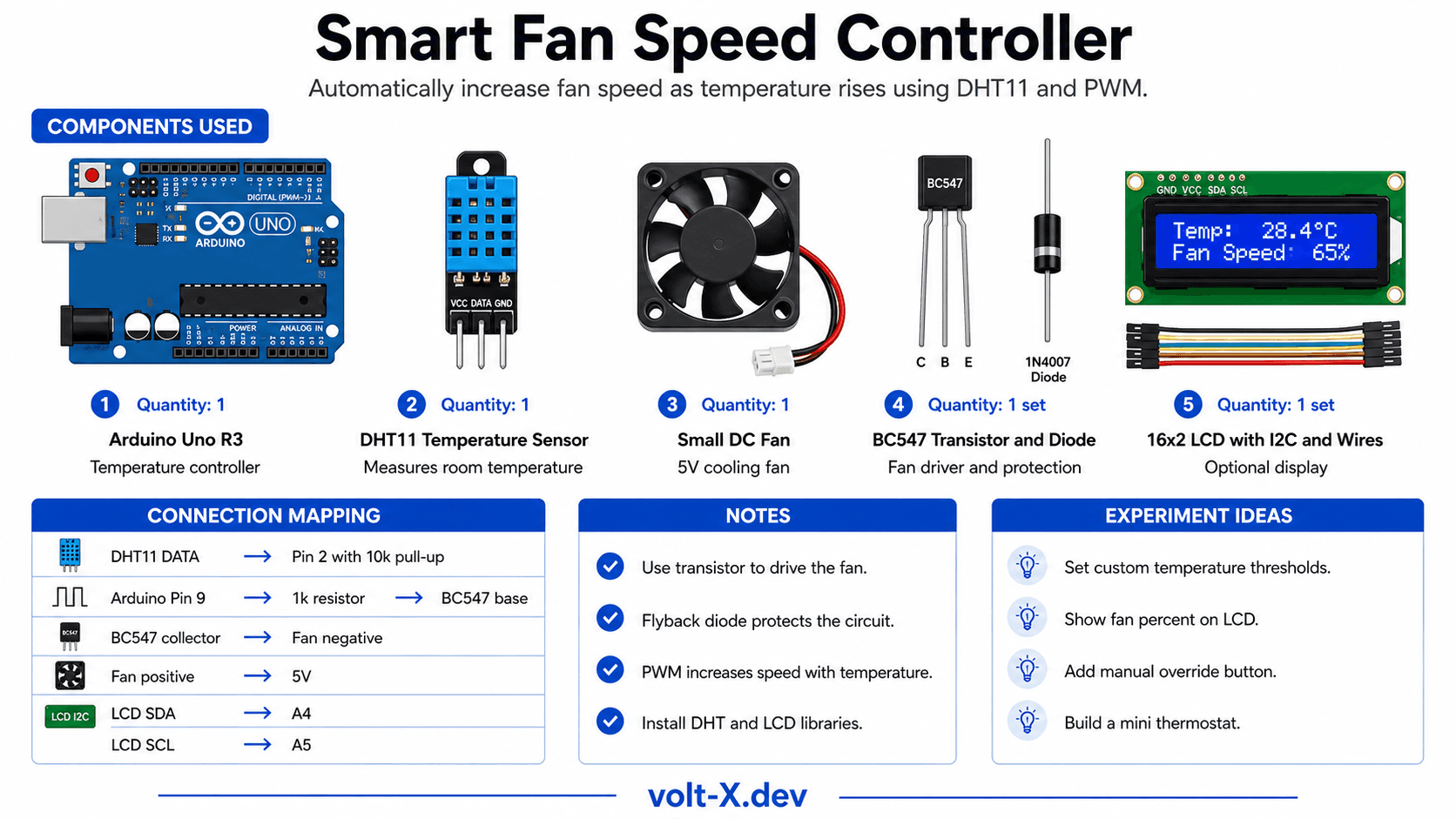
Technical Insight: This is a proportional controller: fan speed scales linearly with temperature above a threshold. For a fully automatic on/off fan: below 25°C → fan OFF, 25–35°C → fan mapped 0–255 PWM, above 35°C → fan 100%. A BC547 transistor or L298N drives the fan from a separate 5V supply.
In simple terms: The DHT11 tells the Arduino how hot it is. The Arduino calculates how hard the fan should blow and adjusts the PWM motor signal in real time. The LCD shows current temperature and fan speed percentage.
What you'll learn: DHT11 sensor interfacing, proportional control algorithms, PWM motor speed mapping, LCD integration, and practical thermal engineering concepts.
Estimated time: 45-60 minutes. Difficulty: ⭐⭐ Easy — a complete real-world embedded system.
Components Needed
| Component | Specification | Qty | Notes |
|---|---|---|---|
| Arduino Uno R3 | 5V | 1 | |
| DHT11 Temperature Sensor | 0–50°C, ±2°C | 1 | |
| Small DC Fan (5V) | 5V DC, <200mA | 1 | CPU fan or small hobby fan |
| BC547 Transistor | NPN, 100mA | 1 | Drives the fan from PWM pin |
| 1kΩ Resistor (base) | 1 | ||
| 1N4007 Flyback Diode | 1 | Across fan motor | |
| 10kΩ Resistor | Pull-up for DHT11 | 1 | |
| 16x2 LCD with I2C | 1 | Optional display |
Component Pin Mapping
Step-by-Step Tutorial
Wire DHT11
Wire Fan Driver
Connect LCD
Install Libraries
Upload and Test
Arduino Code
// Smart Fan Speed Controller — Volt X
#include <DHT.h>
#include <Wire.h>
#include <LiquidCrystal_I2C.h>

#define DHTPIN  2
#define DHTTYPE DHT11
DHT dht(DHTPIN, DHTTYPE);
LiquidCrystal_I2C lcd(0x27, 16, 2);

const int FAN_PIN   = 9; // PWM pin → BC547 base via 1kΩ
const float T_LOW   = 25.0; // Below: fan OFF
const float T_HIGH  = 35.0; // Above: fan 100%

void setup() {
  pinMode(FAN_PIN, OUTPUT);
  dht.begin();
  lcd.init(); lcd.backlight();
  Serial.begin(9600);
}

void loop() {
  float temp = dht.readTemperature();
  if (isnan(temp)) { delay(2000); return; }
Reviews & Ratings
Sign in to leave a review
Loading reviews...