🔄 DC Motor Speed Controller
Control a DC motor from dead-stop to full speed using a potentiometer and PWM — the foundation of all motor drives.
Overview
DC motors are everywhere — in fans, wheels, pumps, and drills. This project teaches you to control their speed using Pulse Width Modulation (PWM) and an L298N motor driver to safely handle higher currents.
Technical Insight: The L298N dual H-bridge driver accepts PWM signals from Arduino and controls motor voltage using power transistors rated at 2A peak. By varying the duty cycle of the PWM from 0% (stopped) to 100% (full speed), the average voltage to the motor changes proportionally, allowing smooth, continuous speed control.
In simple terms: The potentiometer knob is your 'throttle.' The Arduino reads it (0–1023), scales it to a PWM value (0–255), and sends that to the L298N, which drives the motor at exactly that speed fraction.
What you'll learn: L298N motor driver wiring, analogRead() + analogWrite(), motor speed-to-PWM mapping, direction control with H-bridge logic, and flyback protection.
Estimated time: 40-55 minutes. Difficulty: ⭐⭐ Easy.
Components Needed
| Component | Specification | Qty | Notes |
|---|---|---|---|
| Arduino Uno R3 | 5V | 1 | |
| L298N Motor Driver | 2A, 5–35V | 1 | Dual H-Bridge module |
| DC Motor | 6–12V, any small DC motor | 1 | Hobby motor, fan, or pump |
| Potentiometer | 10kΩ Linear | 1 | Speed control knob |
| Power Supply | 9V battery or 12V adapter | 1 | For L298N motor supply |
| Breadboard + Wires | Full-size | 1 |
Component Pin Mapping
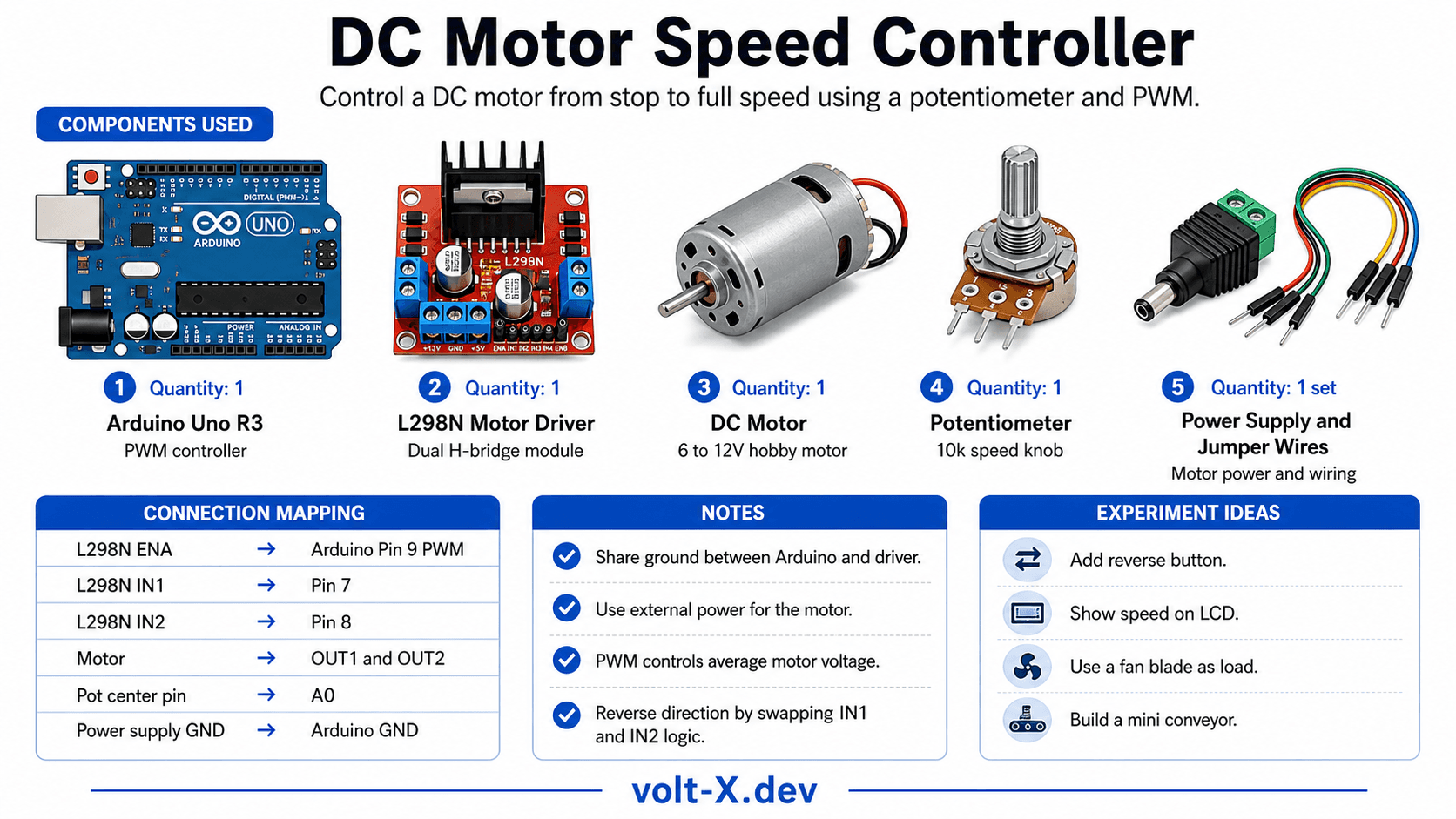
Step-by-Step Tutorial
Wire the L298N
Wire the Potentiometer
Set Direction
Adjust Speed
Add Reverse
Arduino Code
// DC Motor Speed Controller — Volt X
// Potentiometer on A0 controls speed via L298N ENA pin

const int ENA = 9;  // PWM speed control (must be ~ pin)
const int IN1 = 7;  // Direction pin 1
const int IN2 = 8;  // Direction pin 2
const int POT = A0; // Potentiometer

void setup() {
  pinMode(ENA, OUTPUT);
  pinMode(IN1, OUTPUT);
  pinMode(IN2, OUTPUT);
  // Set forward direction
  digitalWrite(IN1, HIGH);
  digitalWrite(IN2, LOW);
  Serial.begin(9600);
}

void loop() {
  int potVal = analogRead(POT);            // Read 0-1023
  int speed  = map(potVal, 0, 1023, 0, 255); // Scale to 0-255
  analogWrite(ENA, speed);                 // Set motor speed

  Serial.print("Pot: "); Serial.print(potVal);
Serial.print(" Speed PWM: "); Serial.println(speed);Reviews & Ratings
Sign in to leave a review
Loading reviews...