Sound Sensor
Complete engineering manual covering physical operating principles, pinout architecture, circuit schematics, non-blocking Arduino/ESP32 code, and troubleshooting.
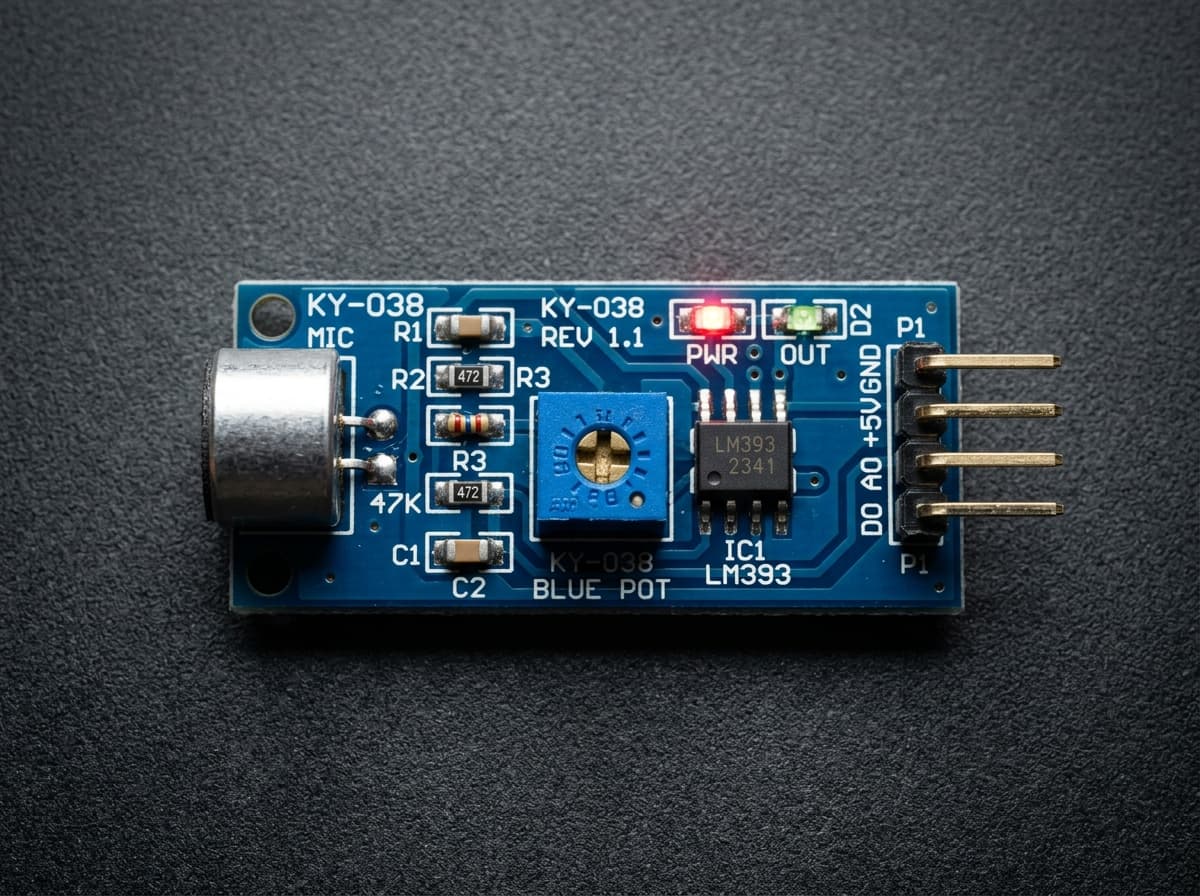
What is a Sound Sensor Module?
A sound sensor module uses an electret microphone and amplifier/comparator circuit to detect claps, knocks, loud events, or approximate sound intensity. KY-038 and LM393 sound modules are common in Arduino clap switches and noise-triggered projects.
These low-cost modules are good for event detection, not calibrated decibel measurement. For accurate audio levels or speech, use a dedicated microphone amplifier or digital MEMS microphone instead.
Key Technical Specifications
Clap Detection
Detects sharp sound events for clap switches, knock sensors, and interaction triggers.
Analog Level Output
AO gives a changing microphone envelope that can be sampled by an ADC pin.
Digital Threshold Output
DO switches when sound crosses the potentiometer-set threshold.
Adjustable Sensitivity
The onboard potentiometer controls how loud a sound must be to trigger the module.
Fast Response
Good for short pulses, taps, and sudden noise changes in beginner projects.
Simple Wiring
Works with Arduino digital and analog pins using only power, ground, and output wires.
Components Required
| Component | Quantity | Engineering Purpose |
|---|---|---|
| Sound Module | 1x | Primary physical environmental sensing module |
| Arduino Uno R3 or ESP32 DevKit | 1x | Microcontroller for ADC sampling and digital processing |
| Solderless Breadboard (830 tie-points) | 1x | Prototyping circuit layout and common power rail distribution |
| Jumper Wires (Male-to-Male, Male-to-Female) | 6x | Interconnecting microcontroller GPIO, power, and ground |
| Decoupling Capacitor (100nF Ceramic) | 1x | Filtering power rail high-frequency switching transient noise |
| Pull-up / Current Limiting Resistor (10kΩ / 220Ω) | 1x | Level conditioning and bus stability |
Pin Configuration & Connection Diagram
VCC
Power input. Many KY-038 modules operate at 3.3V or 5V, but check your board markings.
GND
Ground reference shared with the microcontroller.
AO
Analog microphone envelope output for approximate sound-level readings.
DO
Digital output from the comparator. Goes HIGH or LOW when sound crosses the threshold.
| Sensor Pin | Arduino Uno | ESP32 Node | Signal Description |
|---|---|---|---|
| VCC | 5V (or 3.3V per model) | 3.3V or VIN (5V) | Positive DC supply line. Maintain within datasheet voltage envelope. |
| GND | GND | GND | Common ground reference. Connect all subsystem grounds together. |
| OUT / SIG / DO | D2 (Interrupt-capable) | GPIO 4 | Digital threshold trigger or analog output level. |
| AO (Analog Out) | A0 | GPIO 34 (ADC1 input-only) | Continuous proportional voltage level representing measured physical phenomenon. |
Electrical Best Practices & Noise Mitigation:
- When wiring the Sound, ensure power leads are kept short to minimize stray loop inductance and inductive bounce during rapid current draw changes.
- If using an analog sensor output with a 3.3V microcontroller like an ESP32 or STM32, verify the maximum sensor output does not exceed 3.3V. If operating from a 5V supply, insert a 2:1 resistive voltage divider (e.g. 2kΩ / 1kΩ) on the signal line.
- Place a 100nF ceramic capacitor across the sensor VCC and GND pins as close to the module package as physically possible to shunt high-frequency ripple generated by nearby motors, servos, or Wi-Fi transients.
Working Principle & Mathematical Modeling
The Science Behind It
The electret microphone converts pressure changes in air into a tiny electrical signal. An amplifier raises that signal enough for the module circuit to process.
The analog output follows the amplified sound envelope, while the comparator compares that signal against a potentiometer threshold to create a clean digital trigger.
Event Detection:
Ambient level = moving average of AO
Sound event = AO exceeds ambient + threshold
Digital trigger = comparator output changes state
Note: These modules are not true decibel meters. Use them for relative sound changes unless you add calibrated audio hardware.
Arduino & ESP32 Implementation Code
// Production-Grade Interface for Sound
// Platform: Arduino / ESP32 (volt-X Reference Implementation)

const int SENSOR_PIN = A0;       // Analog input pin
const int DIGITAL_PIN = 2;       // Digital threshold pin
const unsigned long SAMPLE_INTERVAL_MS = 250; // Non-blocking sampling rate

unsigned long lastSampleTime = 0;
const int FILTER_SAMPLES = 8;
int sampleBuffer[FILTER_SAMPLES];
int sampleIndex = 0;

void setup() {
  Serial.begin(115200);
  while (!Serial && millis() < 3000); // Allow USB CDC enumeration

  pinMode(DIGITAL_PIN, INPUT_PULLUP);
  analogReadResolution(10); // Standard 10-bit ADC (1024 counts)

  Serial.println(F("========================================"));
  Serial.println(F("Sound System Initialized"));
  Serial.println(F("volt-X Engineering Lab Reference"));
  Serial.println(F("========================================"));
}

// Moving average filter to suppress high-frequency electrical noise
int getFilteredReading(int rawValue) {
  sampleBuffer[sampleIndex] = rawValue;
  sampleIndex = (sampleIndex + 1) % FILTER_SAMPLES;

  long sum = 0;
  for (int i = 0; i < FILTER_SAMPLES; i++) {
    sum += sampleBuffer[i];
  }
  return sum / FILTER_SAMPLES;
}

void loop() {
  unsigned long currentMillis = millis();

  // Non-blocking telemetry loop without delay()
  if (currentMillis - lastSampleTime >= SAMPLE_INTERVAL_MS) {
    lastSampleTime = currentMillis;

    int rawAnalog = analogRead(SENSOR_PIN);
    int filteredAnalog = getFilteredReading(rawAnalog);
    bool digitalTrigger = digitalRead(DIGITAL_PIN);

    // Proportional voltage calculation: V = (ADC / ADC_MAX) * VREF
    float voltage = (filteredAnalog / 1023.0f) * 5.0f;

    Serial.print(F("Raw: "));
    Serial.print(rawAnalog);
    Serial.print(F(" | Filtered: "));
    Serial.print(filteredAnalog);
    Serial.print(F(" | Voltage: "));
    Serial.print(voltage, 3);
    Serial.print(F("V | Threshold State: "));
    Serial.println(digitalTrigger ? F("HIGH") : F("LOW"));
  }

  // Other robotics / telemetry tasks execute concurrently
}
Code Architecture Breakdown:
- Non-Blocking Execution Architecture: The sketch uses millis() time differentials rather than delay(). This preserves CPU availability for concurrent robotics PID loops, wireless telemetry, or OLED display rendering.
- Circular Moving Average Filter: An 8-sample circular buffer smooths analog jitter caused by thermal fluctuation, electrical EMI, or power rail bounce.
- Calibrated Voltage Conversion: Converts raw 10-bit integer discrete steps into true voltage levels using floating-point proportional scaling.
- Dual Digital & Analog Validation: Reads both continuous analog intensity and the digital comparator output for fault detection and threshold verification.
Real-World Engineering Applications
Automated Industrial Monitoring
Continuous environmental telemetry with threshold alarm triggers and SCADA interface integration.
Autonomous Robotics Navigation
Obstacle avoidance, path finding, and adaptive real-time closed-loop decision making on mobile chassis.
Smart Agriculture & IoT Automation
Battery-efficient sensor nodes transmitting environmental data to MQTT brokers and cloud dashboards.
Safety Interlocks & Security
Fail-safe threshold detection triggering relays, buzzers, and automated machine shutdown protocols.
✅ Engineering Advantages
- Cost-effective and widely available standardized pinout compatible with all microcontrollers.
- Low quiescent current consumption suitable for solar or battery-backed embedded systems.
- Straightforward analog voltage and digital comparator outputs require minimal processor overhead.
- High sampling frequency enables fast transient detection in real-time control applications.
⚠️ Physical Constraints & Limitations
- Analog readings require ADC calibration to account for microcontroller reference voltage drift.
- Environmental factors such as ambient temperature, dust, and humidity can introduce offset errors.
- Unshielded cabling over 50 cm will pick up electromagnetic noise unless differential signaling is used.
Diagnostic & Troubleshooting Guide
| Fault / Symptom | Probable Root Cause | Corrective Action |
|---|---|---|
| Analog reading is completely erratic or floating randomly | Missing common ground between the sensor and microcontroller, or disconnected pin. | Verify a secure GND jumper between the sensor board and Arduino GND rail. |
| Output is saturated at maximum (1023 / 4095) continuously | Signal line shorted to VCC, or sensor operating outside its calibrated input range. | Check breadboard wiring with a multimeter and adjust onboard potentiometer sensitivity. |
| Microcontroller resets whenever sensor triggers | Current inrush or power rail collapse when external actuators (servos/relays) switch. | Power inductive loads from an independent external supply and share common ground. |
| Digital output LED fails to toggle when threshold is exceeded | Comparator potentiometer is set beyond operational boundary limits. | Rotate the onboard multiturn trimpot clockwise until the threshold comparator activates. |
Frequently Asked Questions (EE/ECE Reference)
Q: Can a KY-038 sound sensor measure decibels?
A KY-038 can estimate relative loudness but it is not a calibrated decibel meter. Use it for clap detection or noise events, and choose calibrated audio hardware for reliable dB measurements.
Q: What is the difference between AO and DO on a sound sensor?
AO is the analog sound envelope and changes with signal level. DO is a comparator output that switches when sound crosses the threshold set by the onboard potentiometer.
Q: Why does my sound sensor trigger all the time?
The threshold may be too sensitive, the room may have high background noise, or the power supply may be noisy. Adjust the potentiometer in the final location and add software debounce.