Raspberry Pi Pico W & Wireless RP2040
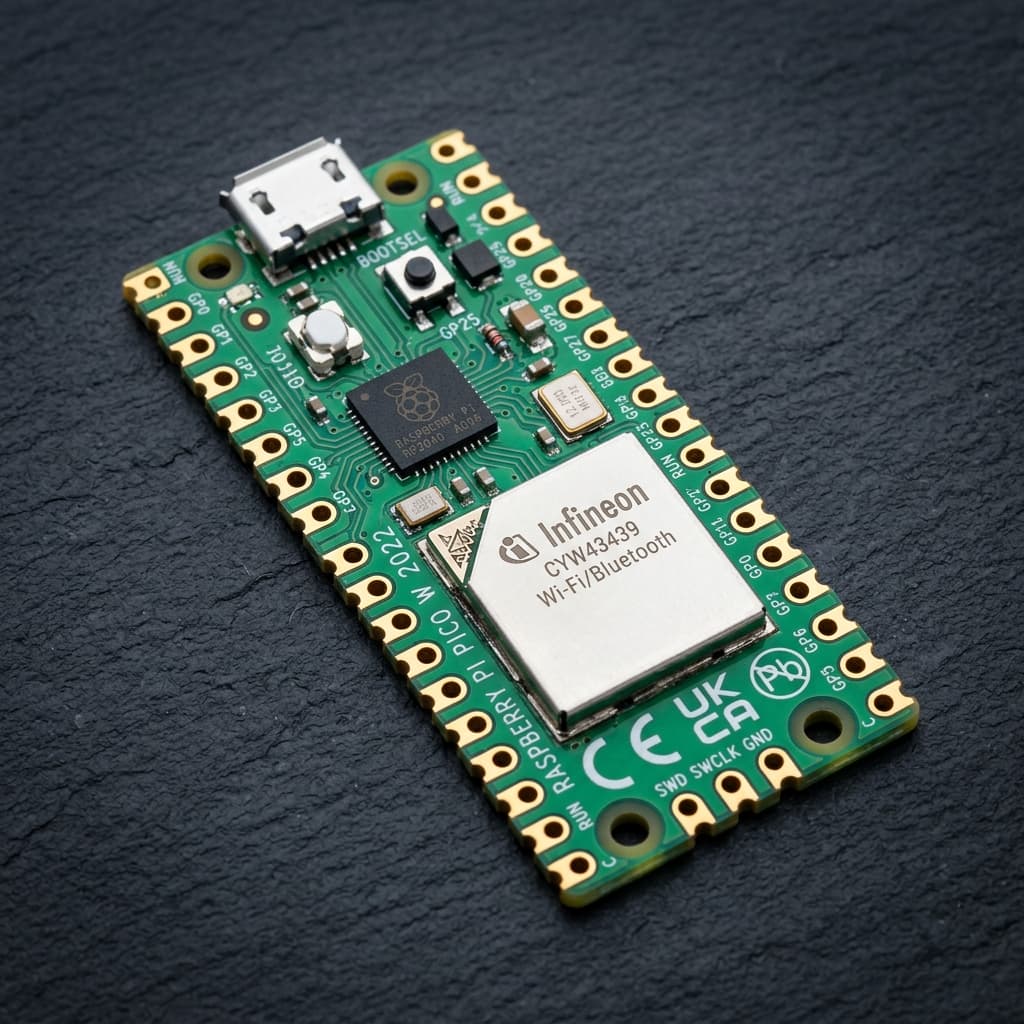
What is Raspberry Pi Pico W & Wireless RP2040?
The Raspberry Pi Pico W brings wireless connectivity to the popular RP2040 microcontroller platform. Powered by Raspberry Pi’s custom silicon dual-core ARM Cortex-M0+ processor running at 133 MHz, it integrates an onboard Infineon CYW43439 metallic-shielded module supporting 2.4 GHz 802.11n Wi-Fi and Bluetooth 5.2 LE.
Retaining the identical physical footprint, castellated pin holes, 264 KB internal SRAM, and 8 Programmable I/O (PIO) state machines as the original Pico, the Pico W enables seamless development in MicroPython, C/C++, and CircuitPython for connected IoT devices, battery monitors, and web interfaces.
Technical Specifications
Recommended Applications & Industry Uses
Connected IoT & Cloud Dashboards
Transmits telemetry over Wi-Fi to AWS IoT, Adafruit IO, or ThingSpeak using MicroPython sockets or lightweight HTTP/MQTT clients.
High-Speed Cycle-Accurate Protocol Emulation
Uses 8 PIO state machines to drive addressable RGB NeoPixel matrices, generate composite/DVI video, or read high-speed optical encoders.
Battery-Powered Environmental Monitors
Integrated buck-boost converter accepts 1.8V to 5.5V from LiPo, 3x AA, or solar cells with low standby current draw.
Wireless Bluetooth HID & Keyboards
Emulates wireless BLE keyboards, gamepads, and macro decks running CircuitPython or custom bare-metal C++ firmware.
Key Features & Architectural Highlights
Infineon CYW43439 Wireless
Wi-Fi 4 + BLE 5.2Seamless 2.4 GHz 802.11b/g/n Wi-Fi and Bluetooth 5.2 LE connectivity controlled via internal SPI bus, keeping standard GPIO pins free for user sensors.
Programmable I/O (PIO)
8 State Machines8 independent state machines execute cycle-perfect assembly to emulate custom protocols (VGA, DVI, I2S, WS2812B) with zero main CPU execution overhead.
Dual ARM Cortex-M0+
133 MHz Dual-CoreParallel dual-core processing allows Core 1 to handle real-time sensor loops or motor PID while Core 0 manages Wi-Fi networking and HTTP client requests.
Zero-Contention Bus Matrix
264KB Multi-Bank SRAM264 KB of SRAM divided into 6 independent banks allows both Cortex-M0+ cores and DMA channels to access memory simultaneously without stalling.
Wide Input Buck-Boost
1.8V - 5.5V SMPSOnboard Richtek RT6154 buck-boost converter allows the board to run seamlessly from USB 5V, single LiPo batteries, or multiple alkaline cells.
First-Class MicroPython Support
MicroPython NativeOfficial MicroPython firmware with precompiled network.WLAN and uasyncio modules enables building responsive asynchronous IoT servers in minutes.
Pin Configuration & Peripheral Layout
Digital GPIO Pins (GP0 - GP28)
26 multi-function 3.3V digital I/O pins with independent pull-up, pull-down, and slew-rate controls.
- All 26 pins support 16 independent hardware PWM channels
- Direct connection to hardware PIO state machines for sub-microsecond pin toggling
- Note: Onboard LED is controlled via CYW43439 wireless chip rather than GP25
Analog ADC Channels (GP26 - GP28)
3 external 12-bit analog input channels (ADC0, ADC1, ADC2) plus internal temperature and voltage channels.
- Reads voltages from 0V to 3.3V with 4096 discrete resolution steps (approx. 0.8 mV per step)
- ADC channel 4 is connected internally to an on-chip silicon temperature sensor
- ADC channel 3 measures VSYS divided by 3 for monitoring battery charge level
Dual SPI, I2C & UART Peripherals
Heavily multiplexed buses that can be routed across almost any GPIO pair.
- Two independent hardware I2C controllers (I2C0, I2C1) supporting up to 1 MHz
- Two high-speed SPI controllers (SPI0, SPI1) running up to 62.5 MHz with DMA support
- Two hardware UART ports (UART0, UART1) supporting high baud rates and FIFO buffers
Communication Protocols
Wi-Fi 802.11n
CYW43439 SPI Bus
Station (client) and SoftAP (hotspot) modes supporting WPA2/WPA3 personal encryption and HTTP/MQTT networking.
Bluetooth 5.2 LE
CYW43439 SPI Bus
BLE Central and Peripheral roles supporting custom GATT services, temperature beacons, and smartphone links.
Programmable I/O
Any 26 GPIO Pins
8 cycle-accurate state machines capable of generating DVI video, driving LED matrix panels, or emulating SDIO.
Hardware SPI (x2)
Flexible GP Pinout
Dual SPI buses capable of streaming 60 FPS graphical data to ST7789 / ILI9341 color TFT display panels.
Hardware I2C (x2)
Flexible GP Pinout
Dual I2C buses for reading sensor clusters (BME280, MPU6050) without address collisions.
Hardware UART (x2)
Flexible GP Pinout
Dual UART channels for serial debugging, GPS modules, or inter-board packet exchanges.
Advanced Topics & Expert Knowledge
MicroPython Asynchronous Web Server
Use uasyncio with MicroPython on the Pico W to handle multiple concurrent HTTP browser connections without blocking sensor sampling loops.
Pro tip: Asynchronous event loops allow serving interactive web control dashboards while simultaneously polling I2C sensors at 100 Hz.
Onboard LED Control Caveat
Unlike the original Pico (where the LED is wired to GP25), the Pico W routes the onboard LED through the CYW43439 chip.
Pro tip: In the C++ SDK, initialize the wireless chip with cyw43_arch_init() before controlling the LED via cyw43_arch_gpio_put().
Dual-Core Parallel Task Delegation
Launch dedicated C++ routines or MicroPython threads onto Core 1 using _thread to eliminate timing jitter from wireless networking.
Pro tip: Use hardware spinlocks or queue mailboxes to pass sensor data between Core 0 and Core 1 safely.
Battery Voltage Monitoring on ADC3
The Pico W includes an internal voltage divider connecting the VSYS power rail to internal ADC3 (GPIO29) to measure remaining battery capacity.
Pro tip: Turn on the internal wireless chip powersave mode (CYW43_POWERSAVE_MODE) to extend battery life by 5x.
PIO State Machine Acceleration
Execute custom cycle-perfect assembly to sample GPIOs or bit-bang protocols without loading either Cortex-M0+ CPU core.
Pro tip: PIO can read bidirectional encoder signals at multi-megahertz frequencies without missing a single pulse.
UF2 Drag-and-Drop Bootloader
Hold the BOOTSEL button while inserting the USB cable. The Pico W mounts as a standard flash drive (RPI-RP2) on any OS for instant flashing.
Pro tip: The BOOTROM is permanently etched in silicon and cannot be corrupted or bricked by bad user code.
Recommended Applications & Industry Uses
Connected IoT & Cloud Dashboards
Transmits telemetry over Wi-Fi to AWS IoT, Adafruit IO, or ThingSpeak using MicroPython sockets or lightweight HTTP/MQTT clients.
High-Speed Cycle-Accurate Protocol Emulation
Uses 8 PIO state machines to drive addressable RGB NeoPixel matrices, generate composite/DVI video, or read high-speed optical encoders.
Battery-Powered Environmental Monitors
Integrated buck-boost converter accepts 1.8V to 5.5V from LiPo, 3x AA, or solar cells with low standby current draw.
Wireless Bluetooth HID & Keyboards
Emulates wireless BLE keyboards, gamepads, and macro decks running CircuitPython or custom bare-metal C++ firmware.
Programming on Raspberry Pi Pico W & Wireless RP2040
📚 Official Citations & Technical References
To ensure the absolute accuracy and reliability of this guide, all specifications, pinouts, and register settings have been cross-verified with official manufacturer documentation:
Related Resources
Frequently Asked Questions
How do I control the onboard LED on the Raspberry Pi Pico W?
On the Pico W, the onboard LED is connected to the CYW43439 wireless chip instead of GP25. In MicroPython, use Pin("LED", Pin.OUT). In C/C++, initialize cyw43_arch_init() and call cyw43_arch_gpio_put(CYW43_WL_GPIO_LED_PIN, 1).
Can the Raspberry Pi Pico W run standard Raspberry Pi Pico code?
Yes! All GPIO pins (GP0 to GP28), PIO state machines, dual Cortex-M0+ cores, and memory layouts are 100% identical. The only hardware difference is the addition of the wireless module and the relocation of the LED pin.
Does the Raspberry Pi Pico W support Bluetooth?
Yes! Firmware support for Bluetooth 5.2 (BLE and Classic Bluetooth) is enabled in both the official C/C++ SDK and recent MicroPython builds using the aioble library.