BBC micro:bit v2 & Nordic nRF52833
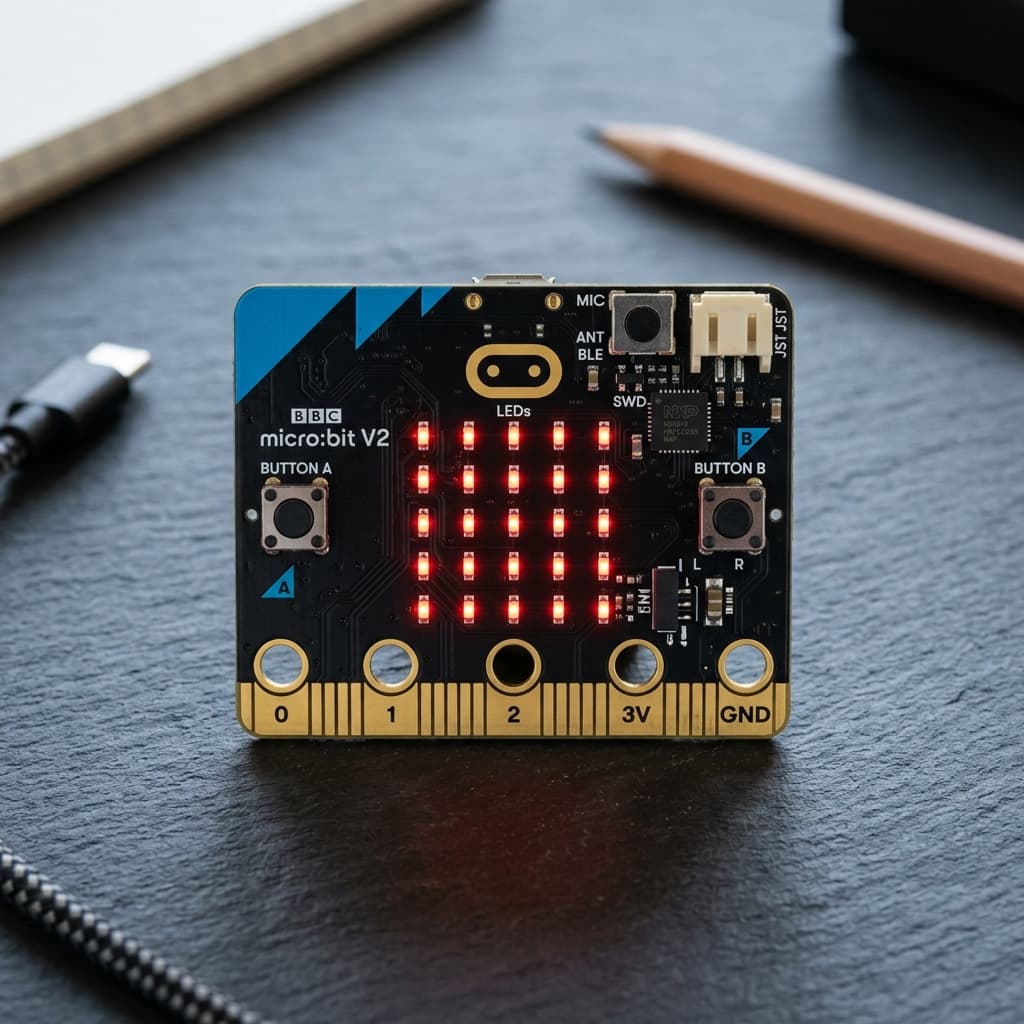
What is BBC micro:bit v2 & Nordic nRF52833?
The BBC micro:bit v2 is a pocket-sized, sensor-rich educational microcontroller board developed by the Micro:bit Educational Foundation. Powered by the Nordic Semiconductor nRF52833 32-bit ARM Cortex-M4 processor running at 64 MHz with integrated floating point (FPU), it is designed to inspire physical computing and creative coding.
Packed with an onboard 5x5 red LED display matrix, discrete A and B tactile pushbuttons, a capacitive touch sensor logo, a Knowles MEMS microphone with LED indicator, an electromagnetic speaker, a 3-axis accelerometer/magnetometer, and 2.4 GHz Bluetooth 5.0 LE / proprietary Radio, the micro:bit v2 offers an unmatched out-of-the-box prototyping experience.
Technical Specifications
Recommended Applications & Industry Uses
Classroom Physical Computing & STEM
Allows middle/high school students to program interactive games, animations, and robotics using Microsoft MakeCode block or Python.
Wearable Motion & Fitness Trackers
Uses the onboard 6-DoF accelerometer and step-counting algorithms to track steps, detect shakes, and communicate with smartphone apps over BLE.
Smart Educational Robotics (Buggy / Rover)
Slots into edge-connector robot chassis to drive dual DC motors, follow infrared lines, and avoid obstacles with ultrasonic sensors.
Multi-Node Swarm Radio Networks
Broadcasts low-latency packets across groups of micro:bits using the simple proprietary radio protocol without needing Wi-Fi routers.
Key Features & Architectural Highlights
5x5 Red LED Matrix Screen
25 Individual LEDsDisplay scrolling letters, numbers, and expressive icons without connecting an external screen. The LEDs double as a photodiode array to detect ambient room light.
Integrated Sound I/O
MEMS Mic + SpeakerBuilt-in microphone listens for claps, snaps, and noise levels with a front-facing LED activity indicator, while the onboard magnetic speaker plays chimes and tones.
Nordic Multiprotocol Wireless
2.4 GHz Radio + BLE 5Exchange packets between nearby micro:bits using the simple micro:bit Radio protocol, or pair with iOS/Android smartphones and tablets over Bluetooth 5.0 LE.
Accelerometer & Compass
6-DoF Motion SensorLSM303AGR motion sensor measures tilt, shake, 3-axis acceleration, freefall drops, and magnetic compass heading for gesture control and interactive games.
Touch-Sensitive Gold Logo
Capacitive LogoThe gold micro:bit logo on the front functions as a capacitive touch sensor, acting as a third user input button alongside the tactile A and B buttons.
Beginner-Friendly Edge Connector
Crocodile Clip RingsLarge circular contact rings for pins 0, 1, 2, 3V, and GND allow connecting external sensors, conductive thread, bananas, and buzzers using alligator clips.
Pin Configuration & Peripheral Layout
Edge Connector Digital Pins
Multi-function edge pins compatible with crocodile clips and standard micro:bit breakout sockets.
- Rings 0, 1, and 2 function as digital GPIOs, touch inputs, or analog inputs
- Pushbuttons A and B are mapped internally to GPIO pins with hardware debouncing
- Pins 8, 12, 13, 14, 15, 16 accessible via edge expansion sockets for servos and motors
Analog Input & Sensing Channels
10-bit and 12-bit ADC channels for sampling resistive sensors, potentiometers, and ambient light.
- Rings 0, 1, and 2 read analog voltages from 0V to 3.3V (0–1023 in MakeCode)
- Display matrix operates in reverse bias to measure ambient illumination level (0–255)
- Microphone input circuit includes an operational amplifier with high-frequency noise filter
Buses, Audio & Power Supply
Internal and external I2C buses, dedicated speaker PWM, and dual power input rails.
- External I2C bus available on pins 19 (SCL) and 20 (SDA) for OLED screens and sensor modules
- Power via Micro-USB (5V regulated to 3.3V) or JST battery connector (2x AAA batteries, 3V)
- Includes dedicated power-off sleep button holding down the rear reset button
Communication Protocols
micro:bit Radio
2.4 GHz Proprietary
Zero-configuration packet broadcasting between micro:bits up to 70 meters range for multiplayer games and swarm robotics.
Bluetooth 5.0 LE
Nordic SoftDevice
Secure wireless pairing with iOS, Android, and Web Bluetooth in Chrome for flashing and telemetry.
Hardware I2C Bus
Edge Pins 19 & 20
External I2C bus communicating with motor driver boards, color sensors, and real-time clocks.
Hardware SPI Bus
Edge Pins 13, 14, 15
High-speed SPI bus for connecting external graphical LCD screens, NeoPixel arrays, and SD cards.
USB Virtual Serial
Micro-USB Connector
115200 baud USB COM port for printing Python sensor telemetry and debugging directly to MakeCode/Thonny.
Sound Level Sensing
Internal Knowles MEMS
Continuously monitors ambient decibel levels to trigger alarms or animations on loud noises.
Advanced Topics & Expert Knowledge
Python Audio Speech Synthesis
The official microbit Python library includes a phoneme speech synthesis engine capable of pronouncing English words and robotic voice phrases.
Pro tip: Adjust pitch, speed, and mouth parameters in the speech module to create distinct alien or robot character voices.
Low-Latency micro:bit Radio Mesh
Broadcast telemetry packets on specific RF channels and power levels (0 to 7) without needing Wi-Fi routers, IP addresses, or pairing steps.
Pro tip: Group multiple micro:bits by assigning unique channel IDs (0–83) to prevent crosstalk in crowded classroom environments.
Power-Off Deep Sleep Mode
Put the nRF52833 into an ultra-low-power sleep state consuming under 10 µA. Wake up the board by tapping the logo or pressing button A.
Pro tip: Allows wearable step-counter watches to run for months on two AAA batteries.
Gesture & Freefall Detection
The onboard accelerometer driver automatically detects pre-computed gestures like "shake", "freefall", "face up", and "tilt right" in silicon.
Pro tip: Detecting gestures in hardware eliminates the need to calculate square roots and vector magnitudes in software.
Ambient Light Level Sensing
Because LEDs are semiconductor diodes, reversing their bias allows measuring ambient lux levels across the 5x5 matrix with zero dedicated sensors.
Pro tip: Use this to build automatic night-lights that illuminate only when the room lights are turned off.
Micro:bit File System & Data Logging
Log sensor readings directly into internal Flash memory using the Python open() filesystem or the MakeCode Data Logger extension.
Pro tip: Connect the micro:bit to your PC to download the recorded CSV data as a standard USB flash file.
Recommended Applications & Industry Uses
Classroom Physical Computing & STEM
Allows middle/high school students to program interactive games, animations, and robotics using Microsoft MakeCode block or Python.
Wearable Motion & Fitness Trackers
Uses the onboard 6-DoF accelerometer and step-counting algorithms to track steps, detect shakes, and communicate with smartphone apps over BLE.
Smart Educational Robotics (Buggy / Rover)
Slots into edge-connector robot chassis to drive dual DC motors, follow infrared lines, and avoid obstacles with ultrasonic sensors.
Multi-Node Swarm Radio Networks
Broadcasts low-latency packets across groups of micro:bits using the simple proprietary radio protocol without needing Wi-Fi routers.
Programming on BBC micro:bit v2 & Nordic nRF52833
📚 Official Citations & Technical References
To ensure the absolute accuracy and reliability of this guide, all specifications, pinouts, and register settings have been cross-verified with official manufacturer documentation:
Related Resources
Frequently Asked Questions
What are the main differences between micro:bit v1 and v2?
The micro:bit v2 upgrades to a 64 MHz ARM Cortex-M4 processor with FPU (doubling Flash to 512 KB and quadrupling RAM to 128 KB). It also adds a built-in MEMS microphone, an onboard speaker, a capacitive touch logo, and a power-off sleep button.
Can the micro:bit v2 be powered with batteries?
Yes! The micro:bit v2 includes a dedicated JST-PH battery connector designed for a 2x AAA battery pack (supplying 3V). It also includes auto-power switching when plugged into USB.
How do I connect external sensors and motors to the micro:bit?
You can connect standard crocodile clip wires directly to the large circular rings (0, 1, 2, 3V, GND). For advanced projects requiring more GPIOs, plug the micro:bit into an edge connector breakout board.