📏 Ultrasonic Distance Meter
Build a handheld device that measures how far away an object is using the HC-SR04 ultrasonic sensor.
Overview
The HC-SR04 sends a 40kHz ultrasonic pulse and measures the time it takes to bounce back. Since we know the speed of sound (~343 m/s), we can calculate distance with simple math.
What you'll learn: pulseIn(), TRIG/ECHO sensor protocol, microseconds→cm conversion, and Serial Monitor output.
Estimated time: 30–40 minutes. Difficulty: ⭐ Beginner-friendly.
Components Needed
| Component | Specification | Qty | Notes |
|---|---|---|---|
| Arduino Uno R3 | 5V | 1 | |
| HC-SR04 | 2-400cm, +/-3mm | 1 | Ultrasonic sensor |
| Breadboard + Wires | Half-size | 1 | |
| USB Cable | Type A to B | 1 |
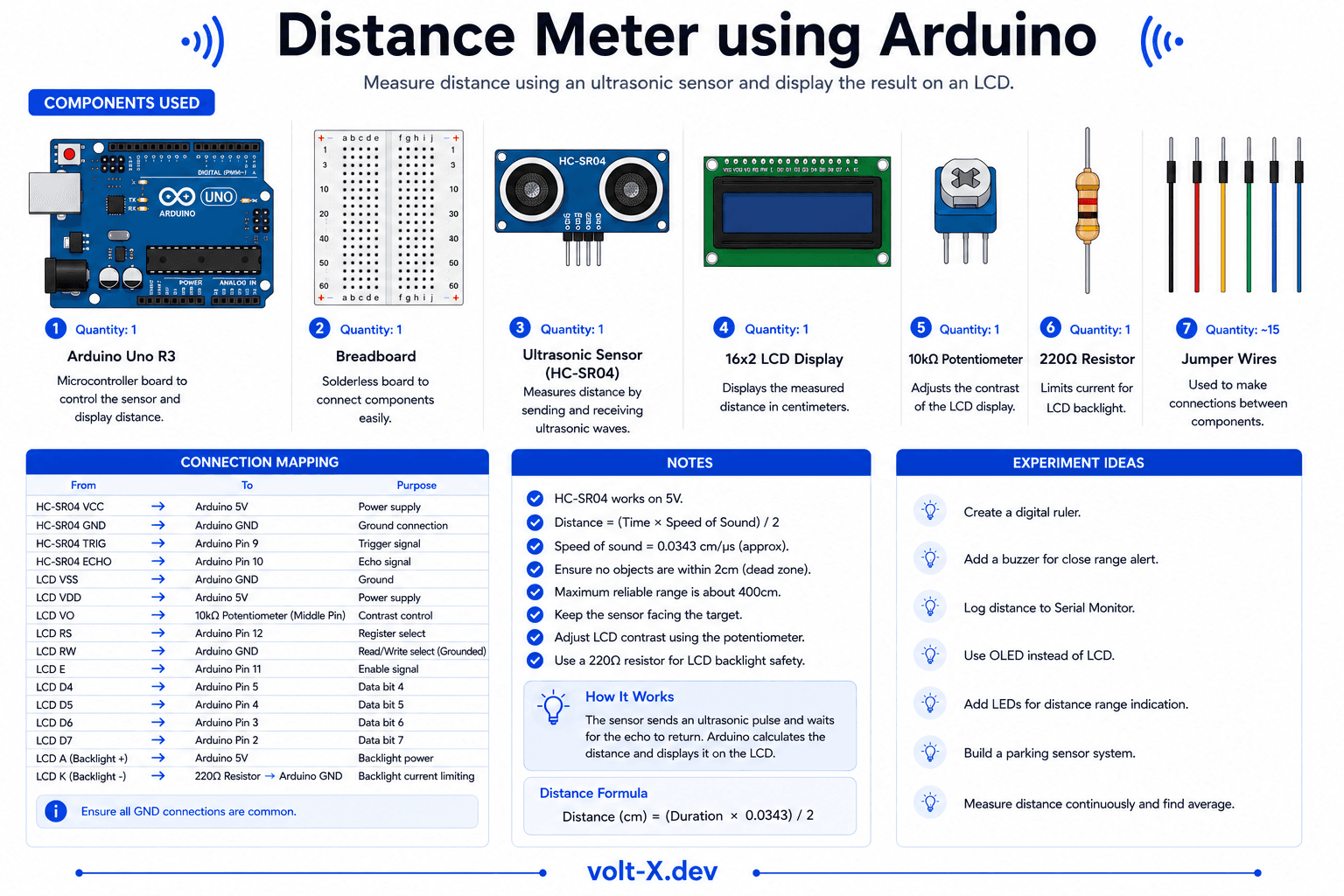
Component Pin Mapping
Step-by-Step Tutorial
1
Connect the HC-SR04
VCC -> Arduino 5V, GND -> GND, TRIG -> pin 9, ECHO -> pin 10.
2
Upload the Code
Paste code and upload. The sensor will start measuring immediately.
3
Open Serial Monitor
Set baud to
9600. Point the sensor at objects -> distance in cm will update in real-time.4
Add an LED Alert
Optionally add an LED on pin 13 that lights up when an object is closer than 10cm.
The sensor has a blind spot under ~2cm. Very close objects may give incorrect readings. Aim the sensor straight at a flat, hard surface for best results.
Arduino Code
distance_meter.ino
INO
// Ultrasonic Distance Meter — Volt X
const int TRIG = 9, ECHO = 10;

void setup() {
  pinMode(TRIG, OUTPUT);
  pinMode(ECHO, INPUT);
  Serial.begin(9600);
}

long getDistance() {
  digitalWrite(TRIG, LOW);
  delayMicroseconds(2);
  digitalWrite(TRIG, HIGH);
  delayMicroseconds(10);
  digitalWrite(TRIG, LOW);

  long duration = pulseIn(ECHO, HIGH);
  return duration * 0.034 / 2; // Convert to cm
}

void loop() {
  long dist = getDistance();
  Serial.print("Distance: ");
  Serial.print(dist);
Serial.println(" cm");Reviews & Ratings
—0 reviews
Sign in to leave a review
Loading reviews...